
Client Side validation in Struts 2 application


In this section we will see how to write code that will generate Java Script code for client side validation. In the last section we developed Login-validator.xml configuration file for defining the server side validation. In this section we will use the same Login-validator.xml file for generating the client side java script.
Developing JSP pages
Here is the code of login jsp page (loginClientSideValidation.jsp)
| <%@ taglib prefix="s" uri="/struts-tags" %> <html> <head> <title>Struts 2 Login Application!</title> <link href="<s:url value="/css/main.css"/>" rel="stylesheet" type="text/css"/> </head> <body> <s:form action="doLoginClientSideValidation" method="POST" validate="true"> <tr> <td colspan="2"> Login </td> </tr> <s:actionerror /> <s:fielderror /> <s:textfield name="username" label="Login name"/> <s:password name="password" label="Password"/> <s:submit value="Login" align="center"/> </s:form> </body> </html> |
Note that in the above code we have just added validate="true" in the <s:form tag...>. This is the only work we have to do and rest work is done by Struts 2 validator framework. The validator framework generates JavaScript for validating the form at client side.
Changes in the struts.xml
Add the following code into struts.xml file:
<action name="showLoginClientSideValidation">
<result>/pages/loginClientSideValidation.jsp</result>
</action>
<action name="doLoginClientSideValidation" class="net.roseindia.Login">
<result name="input">/pages/loginClientSideValidation.jsp</result>
<result name="error">/pages/loginClientSideValidation.jsp</result>
<result>/pages/loginsuccess.jsp</result>
</action>
The action showLoginClientSideValidation displays login form while
doLoginClientSideValidation handles the validation request.
Adding the link into index.html
Finally we add the link in the index.html to access the login form for testing client side validation.
<ul>
<li><a href="roseindia/showLoginClientSideValidation.action">Login Application (Client Side Validation)</a></li>
</ul>
Testing the Client side validation
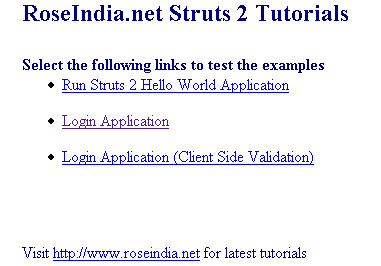
Start tomcat and type http://localhost:8080/struts2tutorial/. Your browser should show the following screen:
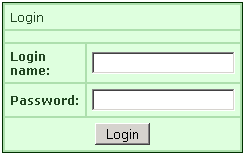
Now click on "Login Application (Client Side Validation)" link. Then your browser will display the Login page as shown below:
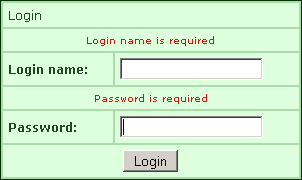
Click on the "Login" button without entering anything. Java Script will show the error message as shown below:
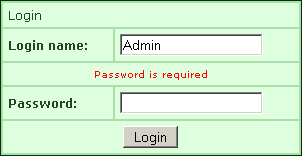
Now enter the "Login Name" and click on the "Login" button, application will show error as shown below:
Examining the Java Script code generated
The following html code is generated by the framework:
| <html>
<head>
<title>Struts
2 Login Application!</title>
<link href="/struts2tutorial/css/main.css"
rel="stylesheet"
type="text/css"/> <script src="/struts2tutorial/struts/xhtml/validation.js"></script> <form namespace="/roseindia" id="doLoginClientSideValidation" name="doLoginClientSideValidation" onsubmit="return validateForm_doLoginClientSideValidation();" action="/struts2tutorial/roseindia/doLoginClientSideValidation.action" method="POST"> <table class="wwFormTable"> <tr> <td colspan="2"> 0Login </td> </tr> 1 <tr> <td class="tdLabel"><label for="doLoginClientSideValidation_username" class="label">Login name:</label></td> <td 2><input type="text" name="username" value="" id="doLoginClientSideValidation_username"/> </td> </tr> 3 <tr> <td class="tdLabel"><label for="doLoginClientSideValidation_password" class="label">Password:</label></td> <td 4><input type="password" name="password" id="doLoginClientSideValidation_password"/> </td> </tr> 5 <tr> <td colspan="2"><div align="center"><input type="submit" id="doLoginClientSideValidation_0" value="Login"/></div></td> 6 </tr> </table></form> 7
<script type="text/javascript"> 8 function validateForm_doLoginClientSideValidation() { form = document.getElementById("doLoginClientSideValidation"); clearErrorMessages(form); 9 clearErrorLabels(form); var errors = false; // field name: username 0 // validator name: requiredstring if (form.elements['username']) { field = form.elements['username']; 1 var error = "Login name is required"; if (field.value != null && (field.value == "" || field.value.replace(/^\s+|\s+$/g,"").length == 0)) { addError(field, error); 2 errors = true; } } 3 // field name: password // validator name: requiredstring if (form.elements['password']) { 4 field = form.elements['password']; var error = "Password is required"; if (field.value != null && (field.value == "" || field.value.replace(/^\s+|\s+$/g,"").length == 0)) { 5 addError(field, error); errors = true; } 6 } return !errors; } 7 </script> </body></html> |
In the above code you can see the JavaScript code and function validateForm_doLoginClientSideValidation() which is generated for client side validation 8