Frameworks| Hibernate| Struts| JSF| JavaFX| Ajax| Spring| DOJO| JDO| iBatis| Questions?


Search Tutorials:
 

Software Solutions and Services


  JDO Tutorials
  EAI Articles
  Struts Tutorials
  Java Tutorials
  Java Certification
  Java Applet
Questions
Comments
 
Set Tag (Data Tag) Example 
 

In this section, we are going to describe the Set tag . The set tag is a generic tag that is used to assign a value to a variable in a specified scope.


Set Tag (Data Tag) Example


In this section, we are going to describe the Set tag. The set tag is a generic tag that is used to assign a value to a variable in a specified scope. It is useful when you wish to assign a variable to a complex expression and then simply reference that variable each time rather than the complex expression. 

Add the following code snippet into the struts.xml file.

struts.xml

<action name="setTag">
       <result>/pages/genericTags/setTag.jsp</result>
</action>

Now create a jsp page using <s:set> tag as  shown in the setTag.jsp page. The set tag is used to assign a value to a variable in a specified scope. The parameters name and value in the tag <s:set name="technologyName" value="%{'Java'}"/> acts as the name-value pair. Here we set the parameters as name="technologyName" value="Java".

setTag.jsp

<%taglib prefix="s" uri="/struts-tags" %>

<html>
  <head>
    <title>Set Tag (Data TagExample!</title>
  </head>
  <body>
    <h1><span style="background-color: #FFFFcc">Set Tag 
                             (
Data TagsExample!</span></h1>
      <s:set name="technologyName" value="%{'Java'}"/>
        Technology Name: <s:property value="#technologyName"/>
  </body>
</html>

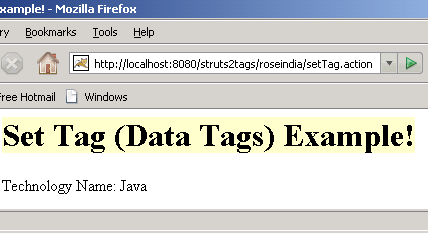
Output of the setTag.jsp:


» View all related tutorials
Related Tags: c jsp io include servlet sed output page generic tag this js to e des section put use ul result

Leave your comment:

Name:

Email:

URL:

Title:

Comments:


Enter Code:

Audio Version
Reload Image
 

Note: Emails will not be visible or used in any way, and are not required. Please keep comments relevant. Any content deemed inappropriate or offensive may be edited and/or deleted.

No HTML code is allowed. Line breaks will be converted automatically. URLs will be auto-linked. Please use BBCode to format your text.

Add This Tutorial To:
  Del.icio.us   Digg   Google   Spurl   Blink   Furl   Simpy   Y! MyWeb 

Current Comments

2 comments so far (
post your own) View All Comments Latest 10 Comments:

If you set a parameter <s:set name="test" value="%{This is a test!}"/>
You can access it like this pageContext.getAttribute("test") in scriptlets

Posted by Hanny on Sunday, 12.23.07 @ 17:33pm | #43476

Hi,
I set a parameter in the above manner using a s:set (Analogous to bean:define in struts 1). But I am unable to access that new parameter in any jsp scriptlets. It always says cannot be resolved when used in scriptlets. Now there is a parameter called scope for the s:set tag which is used to set the scope of the newly created variable. I tried giving scope as page, request but still the same problem comes up. Is it not possibe to use the set tag created variable inside a scriptlet?

Posted by Arup Francis on Friday, 08.24.07 @ 15:39pm | #24039

Training Courses
Tell A Friend
Your Friend Name
Website Designing Services
 
Web Designing Packages From $150!
 
Website Designing Company Web Hosting
 
Website Designing Quotation
 
Search Tutorials:


Home | JSP | EJB | JDBC | Java Servlets | WAP  | Free JSP Hosting  | Search Engine | News Archive | Jboss 3.0 tutorial | Free Linux CD's | Forum | Blogs

About Us | Advertising On RoseIndia.net  | Site Map

India News

Indian Software Development Company | iPhone Development Company in India | Flex Development Company in India | Java Training Delhi | Java Training at Noida |

Send your comments, Suggestions or Queries regarding this site at roseindia_net@yahoo.com.

Copyright © 2008. All rights reserved.