Generator Tag (Control Tags) Using Count Attributes


In this section, we are going to describe the generator
tag using the count
attribute.
Add the following code snippet into the struts.xml
file.
struts.xml
| <action name="GeneratorTagCountAttribute" class="net.roseindia.GeneratorTag"> <result>/pages/genericTags/GeneratorTagCountAttribute.jsp</result> </action> |
Create an action class as shown:
GeneratorTag.java
package net.roseindia;
|
Create a jsp page where the generator tag
<s:generator> generates an iterator with "count"
attribute and
<s:iterator> tag prints it out using the
<s:property /> tag. The separator attribute
separates the val into entries of the iterator.
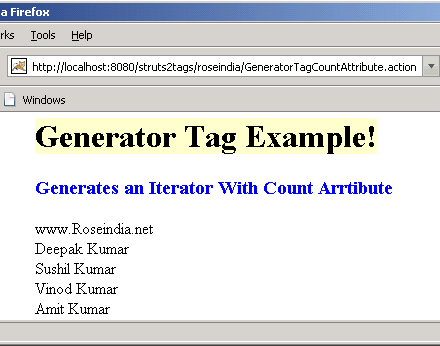
This generates an iterator, but only 5 entries will be
available in the iterator generated, namely
'www.Roseindia.net, Deepak Kumar, Sushil Kumar, Vinod Kumar, Amit Kumar'
respectively because count attribute is set to 5.
GeneratorTagCountAttribute.jsp
<%@ taglib prefix="s" uri="/struts-tags" %>

<html>
  <head>
  <title> Generator Tag Example! </title>
  </head>
  <body>
  <h1><span style="background-color: #FFFFcc">Generator Tag Example!</span></h1>
  <h3><font color="#0000FF"> Generates an Iterator With Count Arrtibute</font></h3>
  <s:generator val="%{'www.Roseindia.net,Deepak Kumar,Sushil Kumar,Vinod Kumar,
  Amit Kumar, Sanjay, Vijay '}" count="5" separator=",">
  <s:iterator>
  <s:property /><br/>
  </s:iterator>
  </s:generator>
  </body>
</html>
Output of the Generator Tag Example:
 |