Date Tag (Data Tag) Example
In this section, we are going to describe the Date
tag. The date tag allows to format a Date in a
quick and easy way. User can specify a custom format (eg. "dd/MM/yyyy
hh:mm"), can generate easy readable notations (like "in 2
hours, 14 minutes"), or can just fall back on a predefined format
with key 'struts.date.format' in the properties file.
If that key is not defined, it will finally fall back
to the default DateFormat.MEDIUM formatting.
Note: If the requested Date object isn't found
on the stack, a blank will be returned.
Configurable attributes are :-
- name
- nice
- format
Add the following code snippet into the "struts.xml"
file.
struts.xml
<action name="dateTag" class="net.roseindia.dateTag">
<result name="success">/pages/genericTags/dateTag.jsp</result>
</action> |
Create an action class as shown below:
dateTag.java
package net.roseindia;
import com.opensymphony.xwork2.ActionSupport;
import java.util.*;
public class dateTag extends ActionSupport {
private Date currentDate;
public String execute() throws Exception{
setCurrentDate(new Date());
return SUCCESS;
}
public void setCurrentDate(Date date){
this.currentDate = date;
}
public Date getCurrentDate(){
return currentDate;
}
}
|
Now create a jsp page using
<s:date>
tag as shown in the success.jsp
page.
The <s:date name="currentDate" format="dd/MM/yyyy" />
date tag formats a Date in a quick and easy way.
Here the "format"
parameter specify a custom format (eg. "dd/MM/yyyy hh:mm")
to follow.
The nice
parameter is of Boolean type which decides whether to print out the date nicely
or not. By Default it is kept false which prints out date nicely i.e.
<s:date name="currentDate" nice="false" />
tag formats a date and similarly <s:date name="currentDate" nice="true" />
does not format a date, it is illustrated in our current jsp page.
dateTag.jsp
<%@ taglib prefix="s" uri="/struts-tags" %>
<html>
<head>
<title>Date Tag (Data Tag) Example!</title>
</head>
<body>
<h1><font color="#000080">Current Date Format</font></h1>
<table border="1" width="35%" bgcolor="ffffcc">
<tr>
<td width="50%"><b><font color="#000080">Date Format</font></b></td>
<td width="50%"><b><font color="#000080">Date</font></b></td>
</tr>
<tr>
<td width="50%">Day/Month/Year</td>
<td width="50%"><s:date name="currentDate" format="dd/MM/yyyy" /></td>
</tr>
<tr>
<td width="50%">Month/Day/Year</td>
<td width="50%"><s:date name="currentDate" format="MM/dd/yyyy" /></td>
</tr>
<tr>
<td width="50%">Month/Day/Year</td>
<td width="50%"><s:date name="currentDate" format="MM/dd/yy" /></td>
</tr>
<tr>
<td width="50%">Month/Day/Year Hour<B>:</B>Minute</td>
<td width="50%"><s:date name="currentDate" format="MM/dd/yy hh:mm" /></td>
</tr>
<tr>
<td width="50%">Month/Day/Year Hour<B>:</B>Minute<B>:</B>Second</td>
<td width="50%"><s:date name="currentDate" format="MM/dd/yy hh:mm:ss" /></td>
</tr>
<tr>
<td width="50%">Nice Date (Current Date & Time)</td>
<td width="50%"><s:date name="currentDate" nice="false" /></td>
</tr>
<tr>
<td width="50%">Nice Date</td>
<td width="50%"><s:date name="currentDate" nice="true" /></td>
</tr>
</table>
</body>
</html>
|
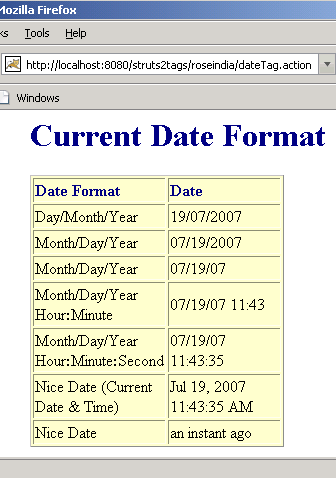
Output of the dateTag.jsp :
|
Current Comments
1 comments so far (post your own) View All Comments Latest 10 Comments:Hi,
The formatting is good, but how do I use this inside a text field?
Regards,
Kishore P
Posted by Kishore on Friday, 02.29.08 @ 12:36pm | #50682