Frameworks| Hibernate| Struts| JSF| JavaFX| Ajax| Spring| DOJO| JDO| iBatis| Questions?


Search Tutorials

Latest Questions
Comments
 
File Tag (Form Tag) Example 
 

In this section, we are going to describe the file tag .


File Tag (Form Tag) Example


In this section, we are going to describe the file tag. The file tag is a UI tag that renders an HTML file input element achieved through browsing.

Add the following code snippet into the struts.xml file.
struts.xml

<action name="fileTag">
      <result>/pages/uiTags/fileTag.jsp</result>
</action>

Create a jsp using the tag <s:file>. It renders an HTML file input element.

The parameter name is used to set a name for element which we have used as name=
"uploadFile".  
and the parameter accept
is the HTML accept attribute that indicates the accepted file mime types which we have used as accept="text/*".

fileTag.jsp    

<%taglib prefix="s" uri="/struts-tags" %>

<html>
  <head>
    <title>File Tag Example!</title>
  </head>
  <body>
  <h1><span style="background-color: #FFFFcc">File Tag Example!</span></h1>
  <b>File Name</b>
  <s:form>
    <s:file name="uploadFile" accept="text/*" />
  </s:form>
  </body>
</html>

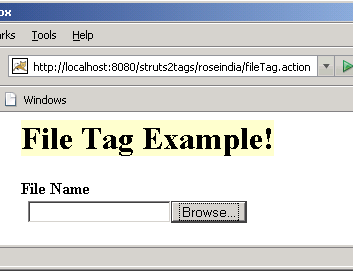
Output of the fileTag.jsp

On clicking the "Browse.." button. You will see a window that can be used to browse a file to upload.


» View all related tutorials
Related Tags: html text ui sed textarea tag tar render tex to ext e area use ml m end s at htm

Leave your comment:

Name:

Email:

URL:

Title:

Comments:


Enter Code:

Audio Version
Reload Image
 

Note: Emails will not be visible or used in any way, and are not required. Please keep comments relevant. Any content deemed inappropriate or offensive may be edited and/or deleted.

No HTML code is allowed. Line breaks will be converted automatically. URLs will be auto-linked. Please use BBCode to format your text.

Add This Tutorial To:
  Del.icio.us   Digg   Google   Spurl   Blink   Furl   Simpy   Y! MyWeb 

Current Comments

3 comments so far (
post your own) View All Comments Latest 10 Comments:

hi it is very good

Posted by satya prasad on Monday, 11.12.07 @ 11:24am | #36946

I got an error with follow message.
Is there anybody knows how to solve this problem?
When i upload a file smaller than 2MB, it works so well-!!
Plea~~~~~se~~~~ help me.
I wanna destroy my laptop now...
----------------------------------------
org.apache.commons.fileupload.FileUploadBase$SizeLimitExceededException: the request was rejected because its size (5096543) exceeds the configured maximum (2097152)
----------------------------------------

I attache pieces of my code.
-----------------------------------------
## Struts.xml
<interceptors>

<interceptor-stack name="authenticationStack">
<interceptor-ref name="fileUpload">
<param name="allowedTypes">
image/*
</param>
<param name="maximumSize">
1024000000
</param>
</interceptor-ref>
<interceptor-ref name="basicStack"/>
</interceptor-stack>

</interceptors>

<action name="RegisterUser" class="authentication.RegisterUser">
<interceptor-ref name="authenticationStack"></interceptor-ref>
............

## InputForm.jsp
<s:file name="photo" label="%{getText('user.photo')}" accept="image/*" />

## ActionClass.java
private File photo;// Client side file
private String photoContentType; // The content type of the file
private String photoFileName; // Server side file name

public File getPhoto() {
return photo;
}

public void setPhoto(File upload) {
this.photo = upload;
}

public String getPhotoContentType() {
return photoContentType;
}

public void setPhotoContentType(String uploadContentType) {
this.photoContentType = uploadContentType;
}

public String getPhotoFileName() {
return photoFileName;
}

public void setPhotoFileName(String uploadFileName) {
this.photoFileName = uploadFileName;
}
...........

-----------------------------------------

Thanks...

Posted by Kim on Tuesday, 08.14.07 @ 23:00pm | #23389

it is use full but the thing is

how to redisplay path that is selected preveiously

Posted by gopal on Thursday, 08.2.07 @ 13:17pm | #22478

Training Courses
Tell A Friend
Your Friend Name
Software Solutions
Least Viewed
Most Rated
Recently Viewed
Search Tutorials


Home | JSP | EJB | JDBC | Java Servlets | WAP  | Free JSP Hosting  | Search Engine | News Archive | Jboss 3.0 tutorial | Free Linux CD's | Forum | Blogs

About Us | Advertising On RoseIndia.net  | Site Map

India News

Indian Software Development Company | iPhone Development Company in India | Flex Development Company in India | Java Training Delhi | Java Training at Noida |

Send your comments, Suggestions or Queries regarding this site at roseindia_net@yahoo.com.

Copyright © 2008. All rights reserved.