Frameworks| Hibernate| Struts| JSF| JavaFX| Ajax| Spring| DOJO| JDO| iBatis| Questions?


Search Tutorials

Latest Questions
Comments
 
Fielderror Tag (Non-Form UI Tags) Example 
 

In this section, we are going to describe the fielderror tags.


Fielderror Tag (Non-Form UI Tags) Example


In this section, we are going to describe the fielderror tags. The fielderror tag is a UI tag that renders field errors if they exists. 

Add the following code snippet into the struts.xml file.
struts.xml

<action name="fieldError">
         <result>/pages/uiTags/loginFielderrorTag.jsp</result>
</action>

<action name="checkUser" class="net.roseindia.checkField">
       <result name="input">/pages/uiTags/loginFielderrorTag.jsp</result>
       <result name="error">/pages/uiTags/fielderrorTag.jsp</result>
       <result>/pages/uiTags/validUser.jsp</result>
</action>

Develop an action class using addFieldError(String fieldName, String errorMessage) method. This method adds an error message for a given field to the corresponding jsp page.
checkField.java

package net.roseindia;
import com.opensymphony.xwork2.ActionSupport;

public class checkField extends ActionSupport {
  private String username = null;
  private String password = null;
  public String execute() throws Exception{
    if ((getUsername().equals("Roseindia")) && 
           (
getPassword().equals("Roseindia"))){
      addActionMessage("Valid User!");
      return SUCCESS;
    }
    if(!(getUsername().equals("Roseindia")))
    addFieldError("username","Invalid username!");

    if(!(getPassword().equals("Roseindia")))
    addFieldError("password","Invalid password!");

    return ERROR;
  }
  //Set and get the user name
  public void setUsername(String username){
    this.username = username;
  }
  public String getUsername(){
    return username;
  }
  //set and get the password
  public void setPassword(String pass){
    password = pass;
  }
  public String getPassword(){
    return password;
  }
}

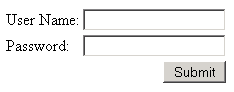
Create a Login jsp page as shown:
loginFielderrorTag.jsp

<%taglib prefix="s" uri="/struts-tags" %>

<html>
  <head>
    <title>Fielderror Tag Example!</title>
  <body>
  <s:form action="checkUser" method="POST">
  <s:textfield label="User Name" name="username" size="20" maxlength="10" />
  <s:password label="Password" name="password" size="20" maxlength="10" />
  <s:submit value="Submit" />
  </s:form>
  
  </body>
</html>

Create a jsp page that will display your field error messages  (when fails to logged-in) using the empty <s:fielderror/> tag as shown:
fielderrorTag.jsp

<%taglib prefix="s" uri="/struts-tags" %>

<html>
  <head>
    <title>Fielderror Tag Example!</title>
  <body>
  <h1>
  <s:fielderror />
        
  </h1>
  <a href="/struts2tags/roseindia/fieldError.action">Go Back</a>
  </body>
</html>

Create a jsp page that will display your messages  (when succeed to logged-in) using the empty <s:actionmessage /> tag as shown:
validUser.jsp

<%taglib prefix="s" uri="/struts-tags" %>

<html>
  <head>
    <title>Fielderror  Tag Example!</title>
  <body>
  <h1>
  <s:actionmessage />
  </h1>
  </body>
</html>

you will see the output of the loginFielderrorTag.jsp as shown below:
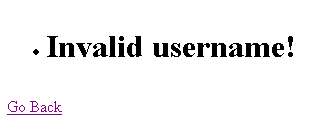
Enter the wrong user name and correct password in the login page
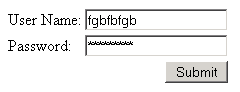
you will get the following output:

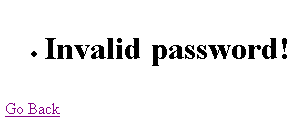
Enter the correct user name and wrong password in the login page
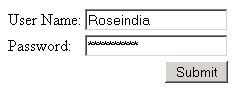
you will get the following output:

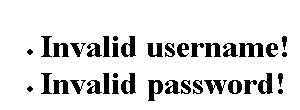
Enter incorrect values in both fields of the login page
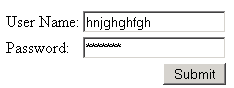
you will get the following output:

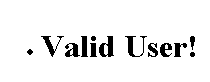
Enter correct values in both fields of the login page
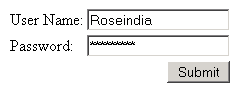
you will get the following output:


» View all related tutorials
Related Tags: html text ui sed textarea tag tar render tex to ext e area use ml m end s at htm

Leave your comment:

Name:

Email:

URL:

Title:

Comments:


Enter Code:

Audio Version
Reload Image
 

Note: Emails will not be visible or used in any way, and are not required. Please keep comments relevant. Any content deemed inappropriate or offensive may be edited and/or deleted.

No HTML code is allowed. Line breaks will be converted automatically. URLs will be auto-linked. Please use BBCode to format your text.

Add This Tutorial To:
  Del.icio.us   Digg   Google   Spurl   Blink   Furl   Simpy   Y! MyWeb 
Training Courses
Tell A Friend
Your Friend Name
Software Solutions
Least Viewed
Most Rated
Recently Viewed
Search Tutorials


Home | JSP | EJB | JDBC | Java Servlets | WAP  | Free JSP Hosting  | Search Engine | News Archive | Jboss 3.0 tutorial | Free Linux CD's | Forum | Blogs

About Us | Advertising On RoseIndia.net  | Site Map

India News

Indian Software Development Company | iPhone Development Company in India | Flex Development Company in India | Java Training Delhi | Java Training at Noida |

Send your comments, Suggestions or Queries regarding this site at roseindia_net@yahoo.com.

Copyright © 2008. All rights reserved.