Div (Ajax Tag) tag Example


In this section, you will learn about the div tag. The div tag is an Ajax component that is used with Ajax that refreshes the content of a particular section without refreshing the entire page.
The div tag when used with Ajax refreshes the content of a particular section without refreshing the entire page.
HTML <DIV /> tag created by Ajax div tag includes it's content and is used to obtain it's content through a remote XMLHttpRequest call through the dojo framework.
THE FOLLOWING ATTRIBUTES ARE VALID IF AJAX IS CONFIGURED
- href: Set 'href' as a url tag reference value.
- errorText: If a request makes any error then 'errorText' is displayed.
- afterLoading: Use 'notifyTopics' since 'afterLoading' has been Deprecated.
- executeScripts: Setting the value of 'executeScripts' to true allows the javascript sections to execute in the returned text.
- loadingText: On making the request the 'targets' element displays the text 'loadingText'.
- listenTopics: The comma separated list 'listenTopics' is the list of topic names that is used to trigger a request.
- handler: The function that takes care of any AJAX request is termed as 'handler'. The function uses Dojo's widget and dom node as parameters to be passed).
- formId: The fields of the formId are used to serialize and pass as the parameters in the request.
- formFilter: The function 'formFilter' is used to filter the fields that are to be serialized which receives the elements as parameters and returns true if the element is included.
- targets: Here 'targets' is the list of ids to be updated with the text returned from request.
- notifyTopics: 'notifyTopics' is nothing but
the list of topic names separated by commas to be published. It takes
three parameters.
- data: is the html or json object while type = 'error' or type = 'error'
- type: it should be of the type 'before' before requesting, 'load' whenever request succeeds and 'error' whenever the request fails.
- request: it requests for the javascript
objects if type='error' or
type='load'.
- showErrorTransportText: 'showErrorTransportText' displays the errors on target.
- indicator
The attribute 'updateFreq' refreshes after a certain time period, specified in miliseconds.
The attribute 'autoStart' starts the timer automatically while sets to true which is the default value.
The attribute 'startTimerListenTopics' is used to start the timer whenever 'startTimerListenTopic' is the comma-separated list of topics.
The attribute ''stopTimerListenTopics' is used to start the timer whenever ''stopTimerListenTopics' is the comma-separated list of topics.
'showLoadingText' displays the loaded text on targets while 'separateScript' runs each script in each scope that is unique for each Div.
Add the following code snippet into the struts.xml
file.
strurts.xml
|
<?xml version="1.0" encoding="UTF-8" ?> <!DOCTYPE struts PUBLIC "-//Apache Software Foundation//DTD Struts Configuration 2.0//EN" "http://struts.apache.org/dtds/struts-2.0.dtd"> <struts> <!-- Rose India Struts 2 Tutorials --> <constant name="struts.enable.DynamicMethodInvocation" value="false" /> <constant name="struts.devMode" value="true" /> <include file="struts-default.xml"/> <!-- Add packages here --> <package name="roseindia" namespace="/roseindia" extends="struts-default"> <action name="div"> <result>/pages/div.jsp</result> </action> </package> </struts> |
Create a jsp using the tag <s:div>.
div.jsp
<%@ taglib prefix="s" uri="/struts-tags" %>
|
mask.jsp
|
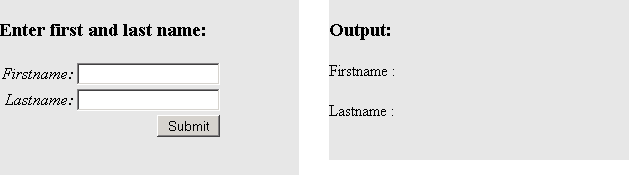
<%@ taglib prefix="s" uri="/struts-tags" %> <html> <head> <title>Enter first and last name</title> <s:head theme="ajax" debug="false"/> </head> <body> <s:div id="maskValue" > <div style="position:absolute;top:10; left:20; width:300; height:175;background-color:#E5E5E5;"> <h3>Enter first and last name:</h3> <s:form theme="ajax" action="doMask"> <s:textfield name="firstname" label="Firstname" /> <s:textfield name="lastname" label="Lastname" /> <s:submit value="Submit" theme="ajax" targets="maskValue" /> </s:form> </div> <br> <div id="8" style="position:absolute;top:10; left:350; width:300; height:160;background-color:#E5E5E5;"> <h3>Output: </h3> Firstname : <s:property value="firstname" /> <br><br> Lastname : <s:property value="lastname" /> </div> </s:div> </body> </html> |
Output: