Password Tag (Form Tag) Example


In this section, we are going to describe the password
tag. The password tag is a UI tag that renders an HTML input tag of type
password.
Add the following code snippet into the struts.xml file.
struts.xml
| <action name="passwordTag"> <result>/pages/uiTags/passwordTag.jsp</result> </action> |
Create a jsp using the tag <s:password>.
It renders an HTML input tag of type password.
passwordTag.jsp
|
<%@ taglib prefix="s" uri="/struts-tags" %> <html> <head> <title>Password Tag Example!</title> </head> <body> <h1><span style="background-color: #FFFFcc">Password Tag Example! </span></h1> <s:form> <s:password label="Enter Password" name="password" size="10" maxlength="8" /> </s:form> </body> </html> |
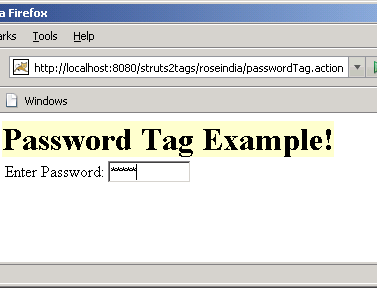
Output of the passwordTag.jsp:
 |