Home Struts Struts2 Struts2uitags Optgroup Tag (Form Tag) Example


Optgroup Tag (Form Tag) Example
Posted on: July 28, 2007 at 12:00 AM
In this section, we are going to describe the optgroup tag

Optgroup Tag (Form Tag) Example


In this section, we are going to describe the optgroup tag. The optgroup tag is a UI tag that creates an optgroup component which needs to reside within a select tag <s:select>.

Add the following code snippet into the struts.xml file.
struts.xml

<action name="optgroupTag">
   <result>/pages/uiTags/optgroupTag.jsp</result>
</action>

Create a jsp using the tag <s:optgroup> within the <s:select> tag. It creates an optgroup component. This tag contains few parameters:

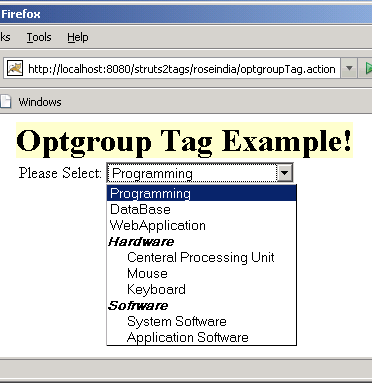
The label parameter sets the label attribute In our case we have set it to "Hardware" and "Software".

optgroupTag.jsp

<%taglib prefix="s" uri="/struts-tags" %>
<html>
  <head>
  <title>Optgroup Tag Example!</title> 
  </head>
  <body>
 <h1><span style="background-color: #FFFFcc">Optgroup Tag Example!
</span></h>

 <s:form>
 <s:select label="Please Select"
  name="select"
 list="%{#{'PROGRAMMING':'Programming', 'DATABASE':'DataBase',
   'WEBAPPLICATION':'WebApplication'}}"
>
  <s:optgroup label="Hardware"
  list="%{#{'CPU':'Centeral Processing Unit','MOUSE':'Mouse',
    'KEYBOARD':'Keyboard'}}" 
/>
  <s:optgroup label="Software"
  list="%{#{'SYSTEM SOFTWARE':'System Software','APPLICATION 
  SOFTWARE':'Application Software'}}" 
/>
  </s:select>
  </s:form>
  </body>
</html>

Output of the optgroupTag.jsp:

Related Tags for Optgroup Tag (Form Tag) Example:
ccomjspideuiselectcomponenttagusingidcreategroupjswithtoeitdesinmntsidsidethinjeswhichsspeeatishaoptgroupeassthhatesiesionomo


More Tutorials from this section

Ask Questions?    Discuss: Optgroup Tag (Form Tag) Example   View All Comments

Post your Comment


Your Name (*) :
Your Email :
Subject (*):
Your Comment (*):
  Reload Image


Ask Questions?

If you are facing any programming issue, such as compilation errors or not able to find the code you are looking for.

Ask your questions, our development team will try to give answers to your questions.