
Doubleselect Tag (Form Tag) Example


In this section, we are going to describe the doubleselect tag. The doubleselect tag is a UI tag that renders two HTML select elements with second one changing displayed values depending on selected entry of first one.
Add the following code snippet into the struts.xml file.
struts.xml
| <action name="doubleselectTag"> <result>/pages/uiTags/doubleselectTag.jsp</result> </action> |
Create a jsp using the tag
<s:doubleselect>
that renders two HTML select elements
with second one changing displayed values depending on selected entry of first
one. This tag contains various parameters:
The headerKey parameter sets the header key of
the second list. Must not be empty. In our case we have set it to"1"
The headerValue parameter sets the header value of
the second list. In our case we have set it to
"--- Please Select ---"
The doubleName parameter sets the
name for complete component. In our case we have set it as : doubleName="dishes"
The doubleList sets the second iterable source to populate from. In our
case we have set it as :
doubleList="top == 'Color' ? {'Black','Green','White',

  'Yellow','Red','Pink'} : { 'Apple','Banana','Grapes','Mango'}"
doubleselectTag.jsp
<%@ taglib prefix="s" uri="/struts-tags" %>
|
Output of the doubleselectTag.jsp:
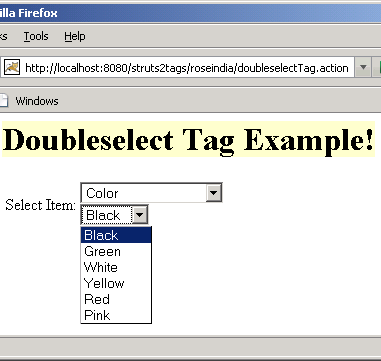 |