Frameworks| Hibernate| Struts| JSF| JavaFX| Ajax| Spring| DOJO| JDO| iBatis| Questions?


Search Tutorials

Latest Questions
Comments
 
Actionerror and Actionmessage Tags (Non-Form UI Tags) Example 
 

In this section, we are going to describe the actionerror and actionmessage tags.


Actionerror and Actionmessage Tags (Non-Form UI Tags) Example


In this section, we are going to describe the actionerror and actionmessage tags. The actionerror tag is a UI tag that renders action errors (in the jsp pages.) if they exists while the actionmessage tag renders action messages if they exists.

Add the following code snippet into the struts.xml file.
struts.xml

<action name="actionerrorTag">
       <result>/pages/uiTags/Login.jsp</result>
</action>

<action name="login" class="net.roseindia.checkValidUser">
      <result name="input">/pages/uiTags/Login.jsp</result>
      <result name="error">/pages/uiT
ags/error.jsp</result>
      <result>/pages/uiTags/validUser.jsp</result>
</action>

Create an action class that uses methods addActionMessage(String) and addActionError(String) within the execute() method. The addActionMessage(String) will print the passed string on the success jsp page while the addActionError(String) will print the passed string on the error jsp page.

checkValidUser.java

package net.roseindia;
import com.opensymphony.xwork2.ActionSupport;
import java.util.*;

public class checkValidUser extends ActionSupport {
  private String username = null;
  private String password = null;
  public String execute() throws Exception{
    if ((getUsername().equals("Roseindia")) && 
    (
getPassword().equals("Roseindia"))){
      
     
addActionMessage("Valid User!");
      return SUCCESS;
    }
    else{
      addActionError("Invalid User!");
      return ERROR;
    }
  }
  //Set and get the user name
  public void setUsername(String name){
    username = name;
  }
  public String getUsername(){
    return username;
  }
  //set and get the password
  public void setPassword(String pass){
    password = pass;
  }
  public String getPassword(){
    return password;
  }
}

Create a Login jsp page as shown:
Login.jsp

<%taglib prefix="s" uri="/struts-tags" %>

<html>
  <head>
    <title>Actionerror Tag Example!</title>
  <body>
  <s:form action="
loginmethod="POST">
  <s:textfield label="User Name" name="username" size="20" maxlength="10" />
  <s:password label="Password" name="password" size="20" maxlength="10" />
  <s:submit value="Submit" />
  </s:form>
  
  </body>
</html>

Create a jsp page that will display your error message  (when fails to logged-in) using the empty <s:actionerror /> tag as shown:
error.jsp

<%taglib prefix="s" uri="/struts-tags" %>

<html>
  <head>
    <title>Actionerror Tag Example!</title>
  <body>
  <h1>
  <s:actionerror />
  </h1>
  <a href="/struts2tags/roseindia/actionerrorTag.action">Go Back</a>
  </body>
</html>

Create a jsp page that will display a message (when successfully logged-in)  using the empty <s:actionmessage /> tag as shown:

validUser.jsp

<%taglib prefix="s" uri="/struts-tags" %>

<html>
  <head>
    <title>Actionerror Tag Example!</title>
  <body>
  <h1>
  <s:actionmessage />
  </h1>
  </body>
</html>

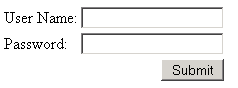
you will see the output of the Login.jsp as shown below:
Enter the wrong user name but correct password in the login page.
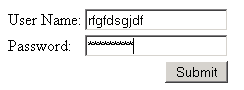
you will get the following output:

Enter the correct user name but incorrect password in the login page
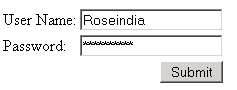
you will get the following output:

Enter correct values in both fields of the login page
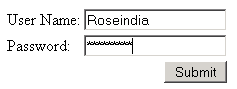
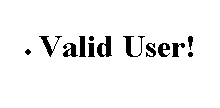
you will get the following output:


» View all related tutorials
Related Tags: html text ui sed textarea tag tar render tex to ext e area use ml m end s at htm

Leave your comment:

Name:

Email:

URL:

Title:

Comments:


Enter Code:

Audio Version
Reload Image
 

Note: Emails will not be visible or used in any way, and are not required. Please keep comments relevant. Any content deemed inappropriate or offensive may be edited and/or deleted.

No HTML code is allowed. Line breaks will be converted automatically. URLs will be auto-linked. Please use BBCode to format your text.

Add This Tutorial To:
  Del.icio.us   Digg   Google   Spurl   Blink   Furl   Simpy   Y! MyWeb 

Current Comments

4 comments so far (
post your own) View All Comments Latest 10 Comments:

I Doahh, I'm also interested by the possibility to remove the dot preceding any actionMessage.

I've tried to add the following snipet in my basic css :

.actionMessage ul{
list-style-type: none;
}

.actionMessage li{
list-style-type: none;
}

But this doesn't give anything...

I've also tried to set the cssClass
attribute with "actionMessage" in the <s:actionmessage/> tag.

Have you got any suggestion on how to do that (I'm rather newbie with css,...)

Thanks,

Sébastien

Posted by vano on Tuesday, 06.10.08 @ 20:55pm | #62964

Write a css style for the ul and li html tags and set list-style-type: none as the rule.

Posted by doahh on Wednesday, 04.23.08 @ 17:12pm | #57695

how can i remove that ugly dot from action error

Posted by vinod on Monday, 02.4.08 @ 11:53am | #47175

how can i have a localization message?
ES:
addActionMessage("i18n.key.validuserString");

I use often server side annotation validation (@), they are localized.

Thanks

Posted by Luke on Monday, 12.10.07 @ 18:24pm | #41737

Training Courses
Tell A Friend
Your Friend Name
Software Solutions
Least Viewed
Most Rated
Recently Viewed
Search Tutorials


Home | JSP | EJB | JDBC | Java Servlets | WAP  | Free JSP Hosting  | Search Engine | News Archive | Jboss 3.0 tutorial | Free Linux CD's | Forum | Blogs

About Us | Advertising On RoseIndia.net  | Site Map

India News

Indian Software Development Company | iPhone Development Company in India | Flex Development Company in India | Java Training Delhi | Java Training at Noida |

Send your comments, Suggestions or Queries regarding this site at roseindia_net@yahoo.com.

Copyright © 2008. All rights reserved.