Checkbox Tag (Form Tag) Example


In this section, we are going to describe the checkbox tag. The checkbox tag is a UI tag that is used to render an HTML input element of type checkbox, populated by the specified property from the ValueStack.
Add the following code snippet into the struts.xml
file.
struts.xml
| <action name="checkboxTag"> <result>/pages/uiTags/checkboxTag.jsp</result> </action> |
Create a jsp using the tag
<s:checkbox> It renders an HTML input element of type chechbox.
checkboxTag.jsp
<%@ taglib prefix="s" uri="/struts-tags" %>
|
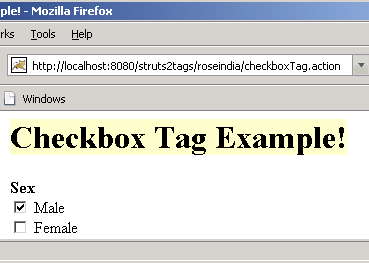
Output of the checkboxTag.jsp :
 |