
Submit Tag (Form Tag) Example


In this section, we are going to describe the submit tag. The submit tag is a UI tag that is used to render a submit button. The submit tag is used with the form tag to provide asynchronous form submissions. The submit can have three different types of rendering:
- input: renders as html <input type="submit"...>
- image: renders as html <input type="image"...>
- button: renders as html <button type="submit"...>
Add the following code snippet into the struts.xml
file.
struts.xml
| <action name="submitTag"> <result>/pages/uiTags/submitTag.jsp</result> </action> |
Create a jsp using the tag <s:submit>
that renders a submit button. This tag contains various parameters:
The value parameter
presets the value of input element. In our 1st case we have set it to "Submit" The
type
parameter sets the type of submit to use. Valid values are
input, button and image. In our case we have set it
to "image"The
src
supplies an image src for image type submit button.
It will have no effect for types input and button. In our case we have set it
to:"/struts2tags/pages/uiTags/submit.gif"
The align
sets HTML
align attribute. In
our case we have set it to:"center"
submitTag.jsp
|
<%@ taglib prefix="s" uri="/struts-tags" %> <html> <head> <title>Submit Tag Example</title> </head> <body> <h1><span style="background-color: #FFFFcc">Submit Tag Example!</span></h1> <s:form> <s:textfield name="username" label="User Name" size="15" maxlength="10" /> <s:textfield name="password" label="Password" size="15" maxlength="10" /> <s:submit value="Submit" /> <!-- To use gif button --> <s:submit type="image" src="/struts2tags/pages/uiTags/submit.gif" align="center" /> </s:form> </body> </html> |
Output of the submitTag.jsp:
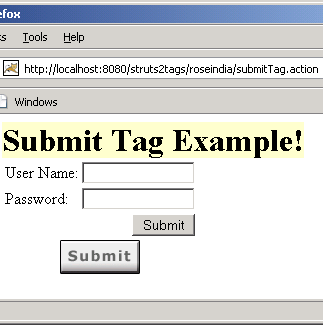 |
