Frameworks| Hibernate| Struts| JSF| JavaFX| Ajax| Spring| DOJO| JDO| iBatis| Questions? | Software Development
 

Validations using Struts 2 Annotations


Validating Struts 2 Login Application using Annotations
In this section we are going to validate our login application using Annotations in Action class. Our current login application does not validate the user against the database. Instead login name and passwords are validated against the hardcode values (User: Admin and Password: Admin) in the actions class.

Working of the application

  1. Login page is displayed to take the inputs.
  2. User enters user name and password and then clicks on the "Login" button.
  3. User validation is done in action class and if user enters Admin/Admin in the user name/password fields, then success pages is displayed. Otherwise the error message is displayed on the screen.

Steps to develop the application

Here are simple and easy steps to develop Login page in the using Struts 2 framework.

  1. Develop Login Form
    The GUI of the application consists of login form (log-in.jsp) and success message page (loginsuccess.jsp) .
    The log-in.jsp is used to display the login page to the user. In our application it is saved in "webapps\struts2tutorial\pages\" folder. Here is the code of log-in.jsp file:

      
    <%@ taglib prefix="s" uri="/struts-tags" %>
    <html>
    <head>
    <title>Struts 2 Login Application!</title>

    <link href="<s:url value="/css/main.css"/>" rel="stylesheet" type="text/css"/>

    </head>
    <body>

    <s:form action="AnnotationAction" method="POST" validate="true">
    <tr>
    <td colspan="2">
    Login
    </td>

    </tr>

      <tr>
       <td colspan="2">
             <s:actionerror />
             <s:fielderror />
      
    </td>
      </tr>

    <s:textfield name="username" label="Login name"/>
    <s:password name="password" label="Password"/>
    <s:submit value="Login" align="center"/>

    </s:form>


    </body>

    </html>

    The code :
    <s:actionerror />
    <s:fielderror />

    displays action errors and field validation errors.

    The code <s:form action="AnnotationAction" method="POST" validate="true"> generates the html form for the application.

    The code :
    <s:textfield name="username" label="Login name"/>
    <s:password name="password" label="Password"/>

    generates Login Name and Password fields.

    The submit button is generated through <s:submit value="Login" align="center"/> code.


    The loginsuccess.jsp page displays the Login Success message when user is authenticated successfully. Here is the code of loginsuccess.jsp file:

    <html>

    <head>

    <title>Login Success</title>

    </head>

    <body>

    <p align="center"><font color="#000080" size="5">Login Successful</font></p>

    </body>

    </html>


  2. Developing Action class (using Annotations to  validate Login forms)
    Now let's develop the action class to handle the login request. The Struts 2 framework provides a base ActionSupport class to implement commonly used interfaces. In our action class (AnnotationAction.java) we have extended ActionSupport class and imported the com.opensymphony.xwork2.validator.annotations package
    For validating the login application java script can be added to the jsp page or in action class, but Struts 2 provides another very easy method to validate your form fields using annotations in the action class. 
    Two annotations are needed,
    1. The @Validation annotation tells to Struts that action in this class might need to be validated. 
    2. The @RequiredStringValidator annotation is used for the text input to hold a singular value. 
    Rest of the care is taken by the framework.

    Our "AnnotationAction"  class is saved in the "webapps\struts2tutorial\WEB-INF\src\java\net\roseindia" directoy. Here is the code of AnnotationAction.java action class:
    In this class we will write the code to validate the login page. 

    AnnotationAction
    .
    java 
package net.roseindia;
 
import 
com.opensymphony.xwork2.ActionSupport;
import com.opensymphony.xwork2.validator.annotations.*;
 

@Validation
 
public class 
AnnotationAction extends ActionSupport {

      
private String username = null;
    
private String password = null;


@RequiredStringValidator(message="Supply name")
  
public String getUsername() {

       return username;
    }


public 
void setUsername(String value) {

          username = value;
    }
  
  
@RequiredStringValidator(message="Supply password")

  
public String getPassword() {
        
return 
password;
    }


public 
void setPassword(String value) {
        
password = value;

    }


public String execute() throws Exception {
        
System.out.println
("Validating login");
    if(!getUsername().equals("Admin"|| !getPassword().equals("Admin")){
            addActionError("Invalid user name or password! Please try again!");
           
 
return ERROR;
    
}
else{
     
 
return SUCCESS;
    }
  
    }
}
  
  1. Configuring action mapping (in struts.xml)
    Now we will create action mapping in the struts.xml file. Here is the code to be added in the struts.xml:
    <action name="LoginAnnotation">
    <result>/pages/log-in.jsp</result>
    </action>

    <action name="AnnotationAction" class="net.roseindia.AnnotationAction">
    <result name="input">/pages/log-in.jsp</result>
    <result name="error">/pages/log-in.jsp</result>
    <result>/pages/loginsuccess.jsp</result>
    </action>

    In the above mapping the action "LoginAnnotation" is used to display the login page and "AnnotationAction" validates the user using action class (AnnotationAction.java).

  2. CSS file (main.css)
    This css file is used to enhance the presentation of the login form. The main.css is saved into "\webapps\struts2tutorial\css" directory.
    Here is the code of main.css:

    @CHARSET "UTF-8";

    body {
    font: 12px verdana, arial, helvetica, sans-serif;
    background-color:#FFFFFF;


    table.wwFormTable {
    font: 12px verdana, arial, helvetica, sans-serif;
    border-width: 1px;
    border-color: #030;
    border-style: solid;
    color: #242;
    background-color: #ada;
    width: 30%;
    margin-left:35%;
    margin-right:35%;
    margin-top:15%;


    table.wwFormTable th {
    }

    table.wwFormTable tr td {
    background-color: #dfd;
    margin: 5px;
    padding: 5px;
    }

    .tdLabel {
    /*
    border-width: 1px;
    border-color: #afa;
    border-style: solid;
    */
    font-weight: bold;
    align: top;


    .label {


    .errorMessage {
    color: red;
    font-size: 0.8em;


    #headerDiv {
    border-style: solid;
    border-width: 1px 1px 0px;
    border-color: black;
    padding: 5px;
    background-color: #7a7;
    /* height: 22px; */
    height: 1.8em;
    /* margin-bottom: 12px; */
    }

    #buttonBar {
    border-width: 0px 1px 1px;
    border-style: solid;
    border-color: black;
    color: white;
    margin-bottom: 12px;
    background-color: #7a7;
    height: 1.6em;
    padding: 5px;
    }

    #appName {
    color: white;
    font-size: 1.8em;
    }

    #pageTitle {
    font-size: 1.4em;
    color: #dfd;
    clear: none;
    }

    #appName, #pageTitle {
    float: right;
    }

    #menuContainer {
    float: left;
    }

    #brandingContainer {
    float: right:
    text-align: right;
    }

Compiling the application

To compile the application go to "\webapps\struts2tutorial\WEB-INF\src" directory and type ant command. The ant tool will compile the application for you.

Adding the link into index.html

Finally we add the link in the index.html to access the login form. 

<ul>
<li><a href="roseindia/LoginAnnotation.action">Action Annotation Example</a></li>
</ul>

Output:

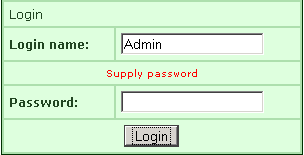
If you click Login button without filling the fields, you will get the output pages as :
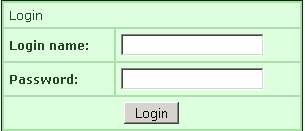
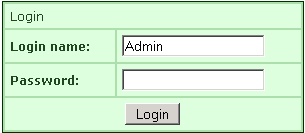
If you fill only the "Login name" field and click Login button without filling the next fields, you will get  the output pages as :
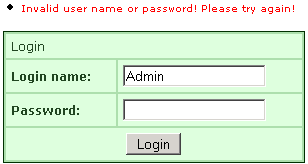
If you fill  the wrong information  and  click the Login button, you will get  the output pages as :

If you fill  the correct information  and  click the Login button, you will get  the output pages as :


» View all related tutorials
Related Tags: c ajax flex deployment ide plugins dojo struts io tags servlet annotations help sed release test vi port new tag

Leave your comment:

Name:

Email:

URL:

Title:

Comments:


Enter Code:

Audio Version
Reload Image
 

Note: Emails will not be visible or used in any way, and are not required. Please keep comments relevant. Any content deemed inappropriate or offensive may be edited and/or deleted.

No HTML code is allowed. Line breaks will be converted automatically. URLs will be auto-linked. Please use BBCode to format your text.

Add This Tutorial To:
  Del.icio.us   Digg   Google   Spurl   Blink   Furl   Simpy   Y! MyWeb 

Current Comments

5 comments so far (
post your own) View All Comments Latest 10 Comments:

@Validation
public class PostItemAction extends ActionSupport implements ModelDriven
Item item;
//getter setters of item
@Validations(
requiredStrings={
@RequiredStringValidator(type = ValidatorType.SIMPLE, fieldName = "item.itemName", message = "", key = "errorItemNameRequired"),
@RequiredStringValidator(type = ValidatorType.SIMPLE, fieldName = "item.itemdescription", message = "", key= "errorItemDescriptionRequired"), @RequiredStringValidator(type = ValidatorType.SIMPLE, fieldName = "amount", message = "", key= "errorStartPriceRequired")
}
)
public String sellItem(){
return SUCCESS;
}
}
------------------
Where
item.itemName--> item is object of Item.java (simple pojo or talking to db..)
itemName is field of ItemVo
-------------------
public class Item{
String name;
String description;
String amount;
//getters setters
}
---------------------
key -->errorItemNameRequired-->you have in Resource file
--------- JSP contains .. something like----------
<s:form action="PostItemAction_sellItem">
<s:textfield name="item.itemName" />
<s:textfield name="item.itemdescription" />
<s:datetimepicker name="item.startDate" />
</s:form>
--------- strust.xml -----------
<action name="PostItemAction_*" method="{1}" class="com.action.PostItemAction">
<result>/item/yourother.jsp</result>
</action>

Posted by Pinki on Wednesday, 10.15.08 @ 11:39am | #81091

@Validation public class PostItemAction extends BaseAction { //here BaseAction extends ActionSupport implements ModelDriven, ServletResponseAware, ServletRequestAware @Validations( requiredStrings={ @RequiredStringValidator(type = ValidatorType.SIMPLE, fieldName = "item.itemName", message = "", key = "errorItemNameRequired"), @RequiredStringValidator(type = ValidatorType.SIMPLE, fieldName = "item.itemdescription", message = "", key= "errorItemDescriptionRequired"), @RequiredStringValidator(type = ValidatorType.SIMPLE, fieldName = "amount", message = "", key= "errorStartPriceRequired") } ) public String sellItem() throws IOException{ return SUCCESS; } } ------------------ Here item.itemName--> item is object of ItemVO.java (simple pojo or talking to db..) itemName is field of ItemVo --------------------- key -->errorItemNameRequired-->you have in Resource file --------- JSP contains .. something like <s:form action="PostItemAction_sellItem"> <s:textfield name="item.itemName" /> <s:textfield name="item.itemdescription" /> <s:datetimepicker name="item.startDate" /> </s:form> --------- strust.xml-->entry <action name="PostItemAction_*" method="{1}" class="com.action.PostItemAction"> <result>/item/yourother.jsp</result> </action>

Posted by pinki on Friday, 09.19.08 @ 21:00pm | #80557

using
1)SomeAction.java-ModelDriven interface.
2)Some.java-Pojo

How to write annotation validate for the fields in some.java which are used by SomeAction.java using getModel()

Posted by pinki on Friday, 08.8.08 @ 20:32pm | #71798

I hava a question,
if I do not use the Struts2 Tag such as <s:form

can I validate the input by using annotation?

Posted by liushl on Wednesday, 03.5.08 @ 14:41pm | #51428

If I want to take the validation error messages from Resource Bundle file when using annotation type validation, how can I do that? And also how can I do it when I do validation with the help of validator framework using xml files.

Posted by Vinod Patil on Wednesday, 02.6.08 @ 11:27am | #47383

 
Tell A Friend
Your Friend Name


Recently Viewed
Software Solutions
Search Tutorials


Home | JSP | EJB | JDBC | Java Servlets | WAP  | Free JSP Hosting  | Search Engine | News Archive | Jboss 3.0 tutorial | Free Linux CD's | Forum | Blogs

About Us | Advertising On RoseIndia.net  | Site Map

India News

Send your comments, Suggestions or Queries regarding this site at roseindia_net@yahoo.com.

Copyright © 2008. All rights reserved.