Home J2me Rectangle Canvas MIDlet Example


Rectangle Canvas MIDlet Example
Posted on: December 11, 2008 at 12:00 AM
The example illustrates how to draw the different types of rectangle in J2ME.

Rectangle Canvas MIDlet Example


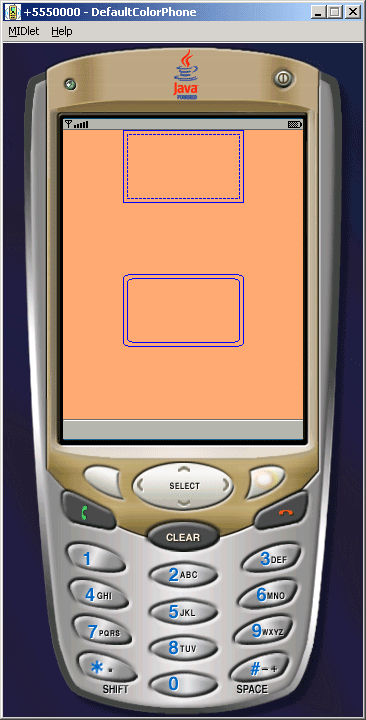
The example illustrates how to draw the different types of rectangle in J2ME. We have created CanvasRectangle class in this example that extends to the Canvas class to draw the given types of rectangle. In this figure first two rectangle draw from the solid and dotted line and the other two rectangle draw as round Rectangle shape. To draw these types of rectangle we are useing following methods:

  • int width = getWidth();   
  • int height = getHeight();
  • g.setColor(255, 162, 117);   
  • g.fillRect(0, 0, width, height);  
  • g.setColor(0, 0, 255);   
  • g.drawRect(width/4, 0, width/2, height/4); 
  • g.setStrokeStyle(Graphics.DOTTED);   
  • g.drawRect(width/4 + 4, 4, width/2 - 8, height/4 - 8);
  • g.setStrokeStyle(Graphics.SOLID);   
  • g.drawRoundRect(width/4, height/2, width/2, height/4, 16, 8); 
  • g.setStrokeStyle(Graphics.SOLID);   
  • g.drawRoundRect(width/4 + 4, height/2 + 4, width/2 - 8, height/4 - 8, 16, 8);

The Application is as follows:


Source Code of RectangleCanvas.java

import javax.microedition.midlet.*;
import javax.microedition.lcdui.*;

public class RectangleCanvas extends MIDlet{
  private Display display;

  public void startApp(){
  Canvas canvas = new CanvasRectangle();
  display = Display.getDisplay(this);
  display.setCurrent(canvas);
  }

  public void pauseApp(){}

  public void destroyApp(boolean unconditional){}
}

class CanvasRectangle extends Canvas {
  public void paint(Graphics g) {
  int width = getWidth();
  int height = getHeight();

  g.setColor(255162117);
  g.fillRect(00, width, height);

  g.setColor(00255);
  g.drawRect(width/40, width/2, height/4);

  g.setStrokeStyle(Graphics.DOTTED);
  g.drawRect(width/44, width/8
  height/
8);

  g.setStrokeStyle(Graphics.SOLID);
  g.drawRoundRect(width/4, height/2, width/2
  height/
4168);

  g.setStrokeStyle(Graphics.SOLID);
  g.drawRoundRect(width/4, height/4
  width/
8, height/8168);
  }
}

Download Source Code

Related Tags for Rectangle Canvas MIDlet Example:
cj2medifftypestypeifexampletorectangledrawexamrawangleeilpeindifferentmnttrjesmehowrateratesxaxampsrectatllmplstrssrenthstfepleplo


More Tutorials from this section

Ask Questions?    Discuss: Rectangle Canvas MIDlet Example   View All Comments

Post your Comment


Your Name (*) :
Your Email :
Subject (*):
Your Comment (*):
  Reload Image


Ask Questions?

If you are facing any programming issue, such as compilation errors or not able to find the code you are looking for.

Ask your questions, our development team will try to give answers to your questions.