Core Java| JSP| Servlets| XML| EJB| JEE5| Web Services| J2ME| Glossary| Questions?


Search Tutorials

Latest Questions
Comments
 
Draw Clip Area Using Canvas 
 

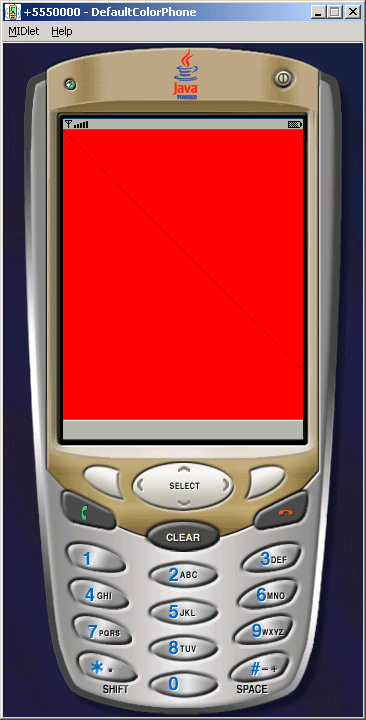
This Example is going to draw a clip with SOLID line. In this picture only solid line show the clipping area.


Draw Clip Area Using Canvas


This Example is going to draw a clip with SOLID line. In this picture only solid line show the clipping area. To draw a solid line, we have used SOLID keyword as given below:

setStrokeStyle(Graphics.SOLID)

and to draw the dotted line we are using DOTTED keyword, as given below:

setStrokeStyle(Graphics.DOTTED)

Methods, that are used in our example code..

  • setColor()
  • fillRect()
  • getWidth()
  • getHeight()
  • g.drawLine()
  • g.setClip()


Source Code of ClipExample.java

 
import javax.microedition.midlet.*;
import javax.microedition.lcdui.*;

public class ClipExample extends MIDlet{
  private Display display;
  
  public void startApp(){
    display = Display.getDisplay(this);
    display.setCurrent (new ClipCanvas())
  }

  public void pauseApp(){}

  public void destroyApp (boolean unconditional){}

  public void commandAction(){}
}

class ClipCanvas extends Canvas{
  public void paint(Graphics g){
    g.setColor(25500);
    g.fillRect(00, getWidth(), getHeight());

    int map = Math.min(getWidth(), getHeight());    
    g.setColor(00255);

    g.setStrokeStyle(Graphics.DOTTED);
    g.drawLine(00, map, map);

    g.setClip(map/4, map/4, map/2, map/2);

    g.setStrokeStyle(Graphics.SOLID);
    g.drawLine(00, map, map);
  }
}


Download Source Code


» View all related tutorials
Related Tags: c j2me diff types type if example to rectangle draw exam raw angle e il pe in different m nt

Leave your comment:

Name:

Email:

URL:

Title:

Comments:


Enter Code:

Audio Version
Reload Image
 

Note: Emails will not be visible or used in any way, and are not required. Please keep comments relevant. Any content deemed inappropriate or offensive may be edited and/or deleted.

No HTML code is allowed. Line breaks will be converted automatically. URLs will be auto-linked. Please use BBCode to format your text.

Add This Tutorial To:
  Del.icio.us   Digg   Google   Spurl   Blink   Furl   Simpy   Y! MyWeb 
Training Courses
Tell A Friend
Your Friend Name
Software Solutions
Least Viewed
Most Rated
Recently Viewed
Search Tutorials


Home | JSP | EJB | JDBC | Java Servlets | WAP  | Free JSP Hosting  | Search Engine | News Archive | Jboss 3.0 tutorial | Free Linux CD's | Forum | Blogs

About Us | Advertising On RoseIndia.net  | Site Map

India News

Indian Software Development Company | iPhone Development Company in India | Flex Development Company in India | Java Training Delhi | Java Training at Noida |

Send your comments, Suggestions or Queries regarding this site at roseindia_net@yahoo.com.

Copyright © 2008. All rights reserved.