J2ME Alert Example


Sound Alerts using MIDlet in J2ME
This example illustrates how to create alert through sound. In this
example we are using AlertType class for the different alert. The AlertType()
class has only one method:
- playSound(Display display):- This is the boolean type method, it is
used to Alert user by playing the sound.
There are different Alert Types in J2ME:
- ALARM
- CONFIRMATION
- ERROR
- INFO
- WARNING
The Application is as follows:
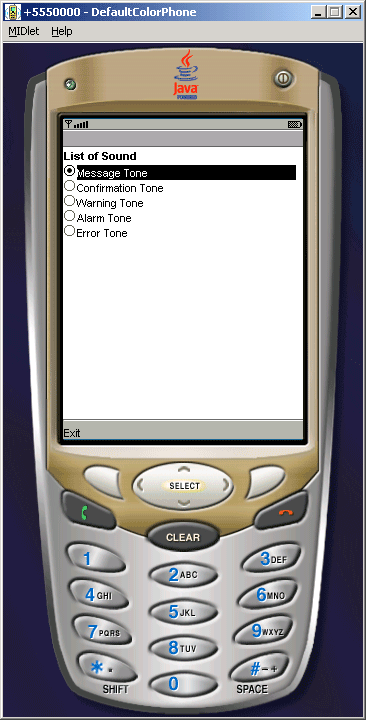
Source code of SoundAlertExample.java
import javax.microedition.midlet.*;

import javax.microedition.lcdui.*;


public class SoundAlertExample extends MIDlet implements

ItemStateListener, CommandListener{
  private Display display;

  private Form form;

  private Command exit;

  private ChoiceGroup choice;


  public void startApp(){

  display = Display.getDisplay(this);

  choice = new ChoiceGroup("List of Sound", Choice.EXCLUSIVE);

  choice.append("Message Tone", null);

  choice.append("Confirmation Tone", null);

  choice.append("Warning Tone", null);

  choice.append("Alarm Tone", null);

  choice.append("Error Tone", null);

  exit = new Command("Exit", Command.EXIT, 1);

  form = new Form("");

  form.append(choice);

  form.addCommand(exit);

  form.setCommandListener(this);

  form.setItemStateListener(this);

  display.setCurrent(form);

  }


  public void pauseApp(){ }


  public void destroyApp(boolean unconditional){

  notifyDestroyed();

  }


  public void commandAction(Command c, Displayable s){

  String label = c.getLabel();

  if(label.equals("Exit")){

  destroyApp(false);

  }

  }


  public void itemStateChanged(Item item){

  switch (choice.getSelectedIndex()){

  case 0:

  AlertType.INFO.playSound(display);

  break;


  case 1:

  AlertType.CONFIRMATION.playSound(display);

  break;


  case 2:

  AlertType.WARNING.playSound(display);

  break;


  case 3:

  AlertType.ALARM.playSound(display);

  break;


  case 4:

  AlertType.ERROR.playSound(display);

  break;

  }

  }

}
|
Download Source Code