Creating Multiple Type List


This example is shows how to create the list which has multiple type choice
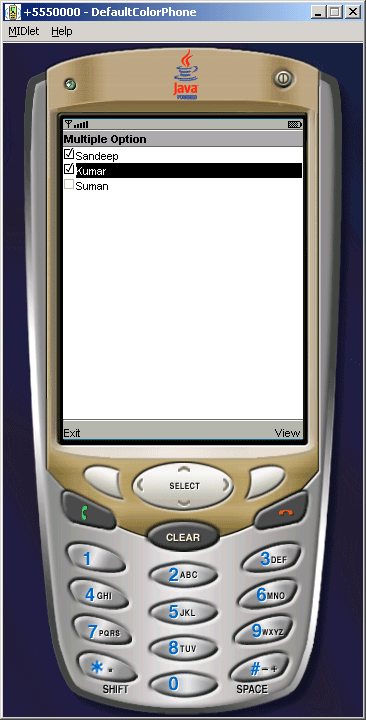
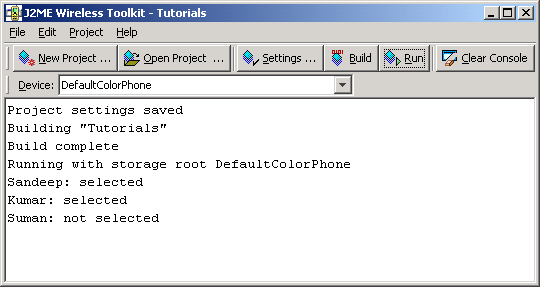
option. In this example user can make selection in name list and after selection
application will display message according to the selection. Like..........
Sandeep: selected
Kumar: selected
Suman: not selected |
The MULTIPLE keyword is used to create the multiple type list as
follows:
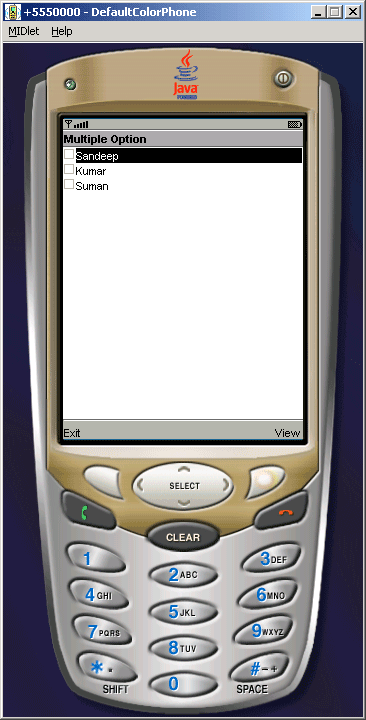
| list = new List("Multiple Option", List.MULTIPLE); |
The application look like as follows:
Source Code Of MultipleList.java
import javax.microedition.midlet.*;

import javax.microedition.lcdui.*;


public class MultipleList extends MIDlet implements CommandListener{

  private Display display;

  private Command exit,view;

  private List list;


  public MultipleList(){

  exit = new Command("Exit", Command.EXIT, 1);

  view = new Command("View", Command.SCREEN,2);

  }


  public void startApp(){

  display = Display.getDisplay(this);

  list = new List("Multiple Option", List.MULTIPLE);

  list.append("Sandeep", null);

  list.append("Kumar", null);

  list.append("Suman", null);

  list.addCommand(exit);

  list.addCommand(view);

  list.setCommandListener(this);

  display.setCurrent(list);

  }


  public void pauseApp(){ }


  public void destroyApp(boolean unconditional){

  notifyDestroyed();

  }


  public void commandAction(Command c, Displayable s){

  String label = c.getLabel();

  if (label.equals("View")){

  boolean selected[] = new boolean[list.size()];

  list.getSelectedFlags(selected);

  for (int i = 0; i < list.size(); i++)

  System.out.println(list.getString(i) + (selected[i] ?


": selected" : ": not selected"));

  }else if (label.equals("Exit")){

  destroyApp(false);

  }

  }

}
|
Output:
Download Source Code