--Ads--
Interactive, Non-Interactive Gauge Example


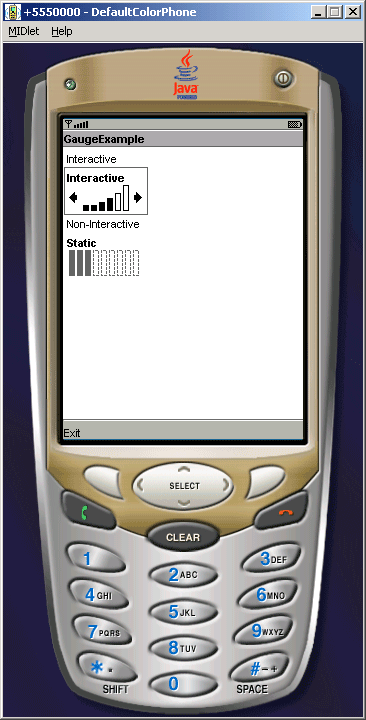
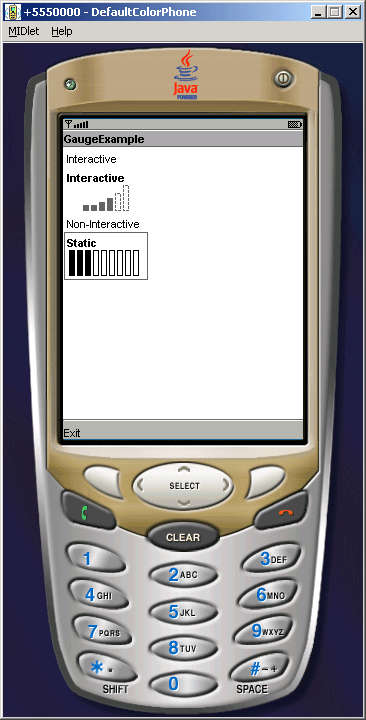
This example shows, how to create the Gauge class to draw the interactive and
non-interactive gauge which is used to display the volume label.
The javax.microedition.lcdui.Gauge class has only one constructor as:
Gauge(String label, boolean interactive, int maxValue, int initialValue):-
This is used to creates a new Gauge object with the given label, in
interactive or non-interactive mode, with the given maximum and initial values.
In this Interactive gauge example, we are using following methods:
- getMaxValue()
- getValue()
- isInteractive()
- setMaxValue(int maxValue)
- setValue(int value)
The Application is as follows:
Source Code of GaugeExample.java
import javax.microedition.lcdui.*;

import javax.microedition.midlet.*;


public class GaugeExample extends MIDlet implements CommandListener{

  private Form form;

  private Display display;

  private Command back;

  private String label1, label2;

  private Gauge gauge1, gauge2;


  public GaugeExample(){

  label1 = new String("Interactive");

  label2 = new String("Non-Interactive");

  gauge1 = new Gauge("Interactive", true, 100, 40);

  gauge2 = new Gauge("Static", false, 100, 40);

  }


  public void startApp(){

  Form form = new Form("GaugeExample");

  back = new Command("Exit", Command.EXIT, 0);

  display = Display.getDisplay(this);

  form.append(label1);

  form.append(gauge1);

  form.append(label2);

  form.append(gauge2);

  form.addCommand(back);

  form.setCommandListener(this);

  display.setCurrent(form);

  }


  public void pauseApp(){}


  public void destroyApp(boolean unconditional){

  notifyDestroyed();

  }


  public void commandAction(Command c, Displayable s){

  String label = c.getLabel();

  if (label.equals("EXIT")){

  destroyApp(false);

  }

  }

}
|
Download Source Code