Building a J2ME sliding menu with text and images(part-2)


In the given J2ME Menus example, we have explained to create two different
buttons that is going to perform as a back and forward buttons. You can see the
series of photographs one by one using these sliding menu in J2ME.
Code to create back and forward button images in J2ME
r_arrow = Image.createImage("/slide_arrow_right.png");
l_arrow = Image.createImage("/slide_arrow_left.png");
|
To change the image as per our next event, we have created a function as
given below:
public void slideItem(int next){

  if(!isImage() && select_index + next >= 0

  && select_index + next < labels.length){

  back_index = select_index;

  select_index += next;

  time = System.currentTimeMillis();

  }

  }
|
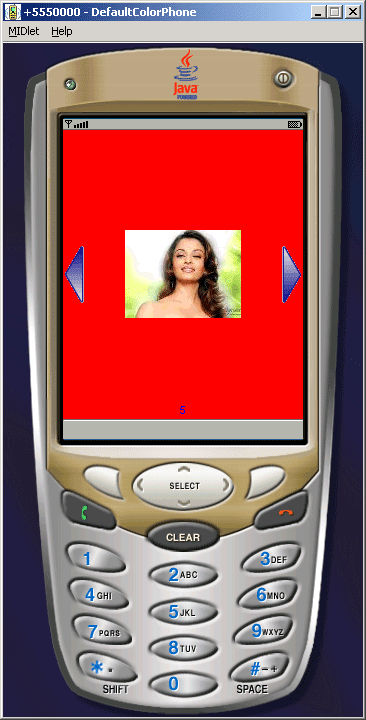
The Application is as follows:
Source Code of SlideMenu.java
import javax.microedition.lcdui.*;


public class SlideMenu{

  public int select_index, back_index, width, height;

  public Image r_arrow, l_arrow;

  String[] labels = null;

  Image[] icons = null;

  public int duration = 500;

  long time = 0;


  public SlideMenu(String[] labels, Image[] icons, int width,

   int height) throws Exception{

  try{

  r_arrow = Image.createImage("/slide_arrow_right.png");

  l_arrow = Image.createImage("/slide_arrow_left.png");

  }catch(Exception e){

  e.printStackTrace();

  }

  this.width = width;

  this.height = height;

  this.labels = labels;

  this.icons = icons;

  }


  public void slideItem(int next){

  if(!isImage() && select_index + next >= 0 && select_index +

  next < labels.length){
  back_index = select_index;

  select_index += next;

  time = System.currentTimeMillis();

  }

  }


  public boolean isImage(){

  return back_index != select_index;

  }


  public void paint(Graphics g){

  g.setColor(255, 0, 0);

  g.fillRect(0, 0, width, height);

  g.setColor(0, 0, 255);


  if(select_index > 0){

  g.drawImage(l_arrow, 2, height / 2,

  Graphics.LEFT | Graphics.VCENTER);

  }


  if(select_index < icons.length - 1){

  g.drawImage(r_arrow, width - 2, height / 2,

  Graphics.RIGHT | Graphics.VCENTER);

  }


  g.drawString(labels[select_index], width / 2,

  height - 2, Graphics.BOTTOM | Graphics.HCENTER);
  g.setClip(l_arrow.getWidth(), 0, width - 2 *

      l_arrow.getWidth(), height);


  if(select_index != back_index){

  int difference = (int)(System.currentTimeMillis() - time);

  if(difference > duration){

  difference = duration;

  }


  int image_present = select_index > back_index ? 1 : - 1;

  int current_image = width / 2 - image_present *

      difference * width / duration;
  int next_image = current_image + width * image_present;


  g.drawImage(icons[back_index], current_image, height / 2,

  Graphics.VCENTER | Graphics.HCENTER);
  g.drawImage(icons[select_index], next_image, height / 2,

  Graphics.VCENTER | Graphics.HCENTER);


  if(difference >= duration){

  back_index = select_index;

  }

  }else{

  g.drawImage(icons[select_index], width / 2, height / 2,

  Graphics.VCENTER | Graphics.HCENTER);

  }

  }

}
|
Download Source Code