
Media MIDlet Example


Creating more then one player in a MIDlet, Here we have created an 'item' object for Hashtable and put all 'wav' file in this table with object 'key' and object 'value' which maps the keys to value. In this example we created a list in which title of songs will be displayed on your mobile screen and you can choose any one at a time to play the song. After selecting the song to play, you can see a blank screen with two option button 'stop' and 'pause'. when you clicks on 'pause' button, start' button will show and song will be paused but when you clicks on start button then the song will continue, You can click on the left side 'stop' button to exit and return on songs list page.
In this example javax.microedition.media package is used to create the player. There are the following class and interface are in this package.
Control:- It is a interface which used to control some media processing functions.
Controllable:- Controllable provides an interface for obtaining the Controls from an object like a Player.
Player:- Player controls the rendering of time based media data.
PlayerListener:- PlayerListener is the interface for receiving asynchronous events generated by Players.
Manager:- Manager is the access point for obtaining system dependent resources such as Players for multimedia processing.
The Application is as follows:
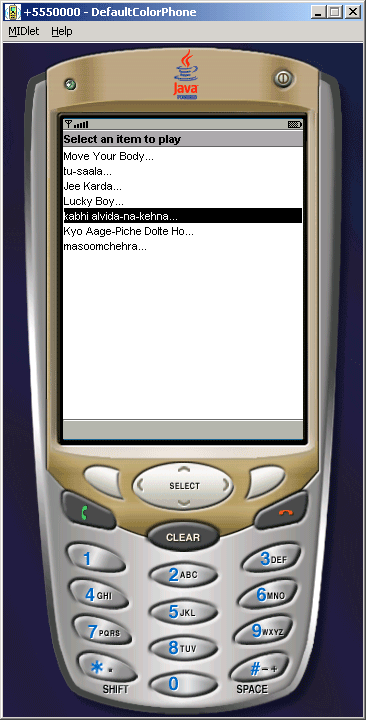
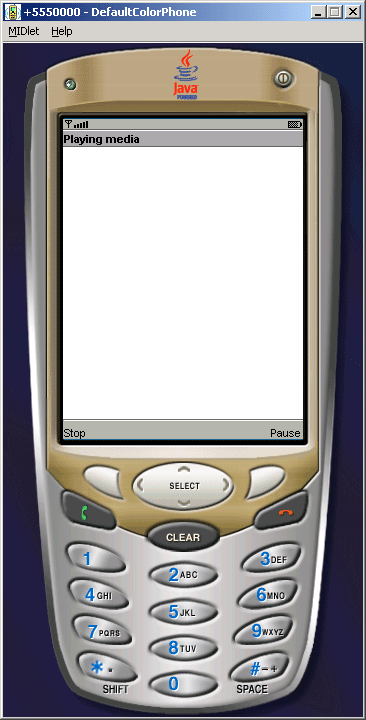
Source Code of MediaMIDlet.java
import java.io.*;
import java.util.*;
import javax.microedition.lcdui.*;
import javax.microedition.midlet.*;
import javax.microedition.media.*;

public class MediaMIDlet extends MIDlet implements CommandListener,
PlayerListener{
  private Display display;
  private List itemList;
  private Form form;
  private Command stopCommand, pauseCommand, startCommand;
  private Hashtable items, itemsInfo;
  private Player player;

  public MediaMIDlet() {
  display = Display.getDisplay(this);
  itemList = new List("Select an item to play", List.IMPLICIT);
  stopCommand = new Command("Stop", Command.STOP, 1);
  pauseCommand = new Command("Pause", Command.ITEM, 1);
  startCommand = new Command("Start", Command.ITEM, 1);
  form = new Form("Playing media");
  form.addCommand(stopCommand);
  form.addCommand(pauseCommand);
  form.setCommandListener(this);
  items = new Hashtable();
  itemsInfo = new Hashtable();

  items.put("Kyo Aage-Piche Dolte Ho...", "file://aagepiche.wav");
  itemsInfo.put("Kyo Aage-Piche Dolte Ho...", "audio/x-wav");

  items.put("kabhi alvida-na-kehna...", "file://kabhi-alvida-na-kehna.wav");
  itemsInfo.put("kabhi alvida-na-kehna...", "audio/x-wav");

  items.put("Lucky Boy...", "file://Lucky-Boy.wav");
  itemsInfo.put("Lucky Boy...", "audio/x-wav");

  items.put("Move Your Body...", "file://Move-Your-Body.wav");
  itemsInfo.put("Move Your Body...", "audio/x-wav");

  items.put("Jee Karda...", "file://Jee-Karda.wav");
  itemsInfo.put("Jee Karda...", "audio/x-wav");

  items.put("masoomchehra...", "file://masoomchehra.wav");
  itemsInfo.put("masoomchehra...", "audio/x-wav");

  items.put("tu-saala...", "file://tu-saala.wav");
  itemsInfo.put("tu-saala...", "audio/x-wav");
  }

  public void startApp() {
  for(Enumeration en = items.keys(); en.hasMoreElements();) {
  itemList.append((String)en.nextElement(), null);
  }
  itemList.setCommandListener(this);
  display.setCurrent(itemList);
  }

  public void pauseApp() {
  try {
  if(player != null) player.stop();
  } catch(Exception e) {}
  }

  public void destroyApp(boolean unconditional) {
  if(player != null) player.close();
  }

  public void commandAction(Command command, Displayable disp){
  if(disp instanceof List) {
  List list = ((List)disp);
  String key = list.getString(list.getSelectedIndex());
  try {
  playMedia((String)items.get(key), key);
  } catch (Exception e) {
  System.err.println("Unable to play: " + e);
  e.printStackTrace();
  }
  } else if(disp instanceof Form){
  try {
  if(command == stopCommand){
  player.close();
  display.setCurrent(itemList);
  form.removeCommand(startCommand);
  form.addCommand(pauseCommand);
  } else if(command == pauseCommand){
  player.stop();
  form.removeCommand(pauseCommand);
  form.addCommand(startCommand);
  } else if(command == startCommand){
  player.start();
  form.removeCommand(startCommand);
  form.addCommand(pauseCommand);
  }
  } catch(Exception e) {
  System.err.println(e);
  }
  }
  }

  private void playMedia(String locator, String key) throws Exception {
  String file = locator.substring(locator.indexOf("file://") + 6,
 locator.length());
  player = Manager.createPlayer(getClass().getResourceAsStream(file),
 (String)itemsInfo.get(key));
  player.addPlayerListener(this);
  player.setLoopCount(-1);
  player.prefetch();
  player.realize();
  player.start();
  }

  public void playerUpdate(Player player, String event, Object eventData) {
  if(event.equals(PlayerListener.STARTED) && new Long(0L).equals((Long)
eventData)){
  display.setCurrent(form);
  } else if(event.equals(PlayerListener.CLOSED)) {
  form.deleteAll();
  }
  }
}