Home J2me Draw Rectangle in J2ME


Draw Rectangle in J2ME
Posted on: October 24, 2008 at 12:00 AM
In this series of J2ME examples and tutorials, we have introduced you with it's various features with examples.

Draw Rectangle in J2ME


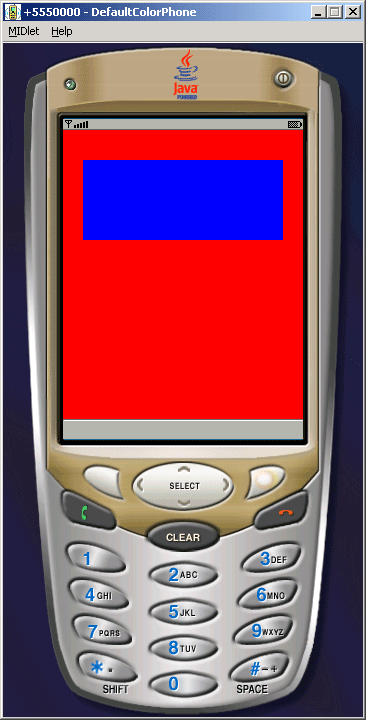
In this series of J2ME examples and tutorials, we have introduced you with it's various features with examples. Now in the given example, you will learn about creating rectangles in J2ME. Please go through the following methods which are used to draw a rectangle using J2ME language:

  • g.setColor (255, 0, 0);
  • g.fillRect (0, 0, getWidth (), getHeight ());   
  • g.setColor (0, 0, 255);   
  • g.fillRect (20, 30, 200, 80);

We have defined it to create rectangle and to set the color of canvas and draw line or box.


Application look like as follows:


Source Code of DrawRectengle.java


import javax.microedition.midlet.*;
import javax.microedition.lcdui.*;

public class DrawRectengle extends MIDlet {
  public void startApp () {
  Display.getDisplay (this).setCurrent (new DrawingDemoCanvas ())
  }

  public void pauseApp () {}

  public void destroyApp (boolean forced) {}
}

class DrawingDemoCanvas extends Canvas {
  public void paint (Graphics g) {
  g.setColor (25500);
  g.fillRect (00, getWidth (), getHeight ());
  g.setColor (00255);
  g.fillRect (203020080);
  }
}

Download Source Code

Related Tags for Draw Rectangle in J2ME:
cj2metutorialsioexamplestutorialfeaturesintriathisieexamplewithtorectanglefeaturelearnexamangleeareilitrectangleslsvarceinnoseriesmntouttrjesmeintrocreatingtorxaxampsrectatishallivmpleaduandarvavarioustutorssrithavabatifepleplndo


More Tutorials from this section

Ask Questions?    Discuss: Draw Rectangle in J2ME  

Post your Comment


Your Name (*) :
Your Email :
Subject (*):
Your Comment (*):
  Reload Image


Ask Questions?

If you are facing any programming issue, such as compilation errors or not able to find the code you are looking for.

Ask your questions, our development team will try to give answers to your questions.