Core Java| JSP| Servlets| XML| EJB| JEE5| Web Services| J2ME| Glossary| Questions?


Search Tutorials

Latest Questions
Comments
 
J2ME List Image 
 

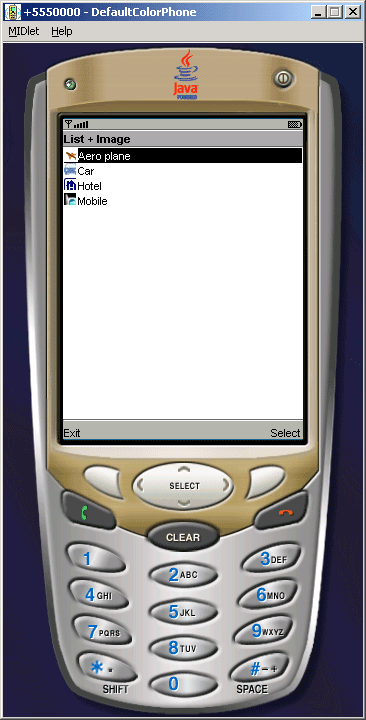
This example illustrates how to create list with image symbol. In this example we are trying to create list using of List class.


J2ME List Image


List Image MIDlet Example

This example illustrates how to create list with image symbol. In this example we are trying to create list using of List class. The List class define in two type of constructors, that is:

  • List(String title, int listType)
  • List(String title, int listType, String[] stringElements, Image[] imageElements) 

The List class has following Methods:

  • append(String stringPart, Image imagePart):- This method is the integer type, which is used to append an element to the choice. 
  • delete(int elementNum):- This is the void type which deletes the element. 
  • getImage(int elementNum):- This is the Image type which gets the image.
  • getSelectedFlags(boolean[] selectedArray_return):- This is integer type method which has the state of a Choice and returns the state of all elements in the boolean array. 
  • getSelectedIndex():- This is the integer type which returns the index number of an element in the Choice that is selected. 
  • getString(int elementNum):- This method is used to get the String of the element.
  • insert(int elementNum, String stringPart, Image imagePart):- This is void type it inserts an element into the Choice just prior to the element specified. 
  • isSelected(int elementNum):- It gets the boolean value indicating whether element is selected or not. 
  • set(int elementNum, String stringPart, Image imagePart):- It sets the element to the specified element, replacing the previous contents of the element. 
  • setSelectedFlags(boolean[] selectedArray)
  • setSelectedIndex(int elementNum, boolean selected)
  • size()

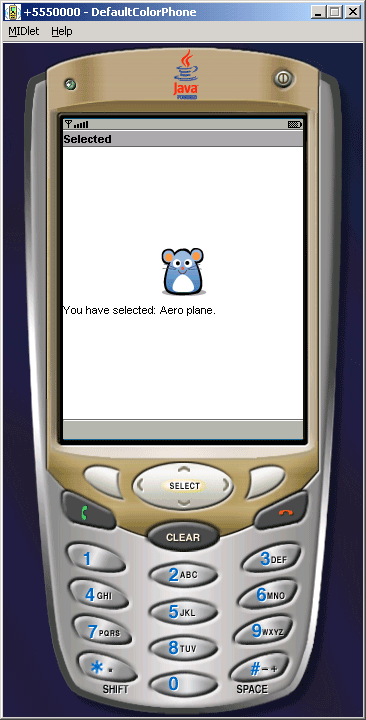
The SELECT_COMMAND is used to recognized whether user select from list or not.


Source Code of ListImage.java 

 
import java.io.IOException;
import javax.microedition.lcdui.*;
import javax.microedition.midlet.*;

public class ListImage extends MIDlet implements CommandListener{
  private Display display;
  private List list;
  private Command exit, next;
  private Image car, airplane, hotel, mobile, cartoon;
  String[] stringElements = {"Aero plane""Car""Hotel""Mobile"};
  
  public ListImage(){
    try{
      airplane = Image.createImage("/airplane.png");
      car = Image.createImage("/car1.png");
      hotel = Image.createImage("/hotel1.png");
      mobile = Image.createImage("/mobile_ico.png");
      cartoon = Image.createImage("/cartoon.png");
    }catch(Exception e){
      System.err.println(e.getMessage());
    }
  }

  public void startApp() {
    display = Display.getDisplay(this);
    Image[] imageElements = {airplane, car, hotel, mobile};
    list = new List("List + Image", List.IMPLICIT, 
stringElements, imageElements
);

    next = new Command("Select", Command.SCREEN, 0);
    exit = new Command("Exit", Command.EXIT, 0);
    list.addCommand(next);
    list.addCommand(exit);
    list.setCommandListener(this);
    display.setCurrent(list);
  }

  public void pauseApp() {}

  public void destroyApp(boolean unconditional){
    notifyDestroyed();
  }

  public void commandAction(Command c, Displayable s){
    int index = list.getSelectedIndex();
    if (c == next || c == List.SELECT_COMMAND) {
      Alert alert = new Alert("Selected""You have selected: 
+ list.getString(index

        + ".", cartoon, AlertType.INFO);
      display.setCurrent(alert, list);
    else if(c == exit){
      destroyApp(true);
    }
  }
}


Download Source Code


» View all related tutorials
Related Tags: c j2me diff types type if example to rectangle draw exam raw angle e il pe in different m nt

Leave your comment:

Name:

Email:

URL:

Title:

Comments:


Enter Code:

Audio Version
Reload Image
 

Note: Emails will not be visible or used in any way, and are not required. Please keep comments relevant. Any content deemed inappropriate or offensive may be edited and/or deleted.

No HTML code is allowed. Line breaks will be converted automatically. URLs will be auto-linked. Please use BBCode to format your text.

Add This Tutorial To:
  Del.icio.us   Digg   Google   Spurl   Blink   Furl   Simpy   Y! MyWeb 
Training Courses
Tell A Friend
Your Friend Name
Software Solutions
Least Viewed
Most Rated
Recently Viewed
Search Tutorials


Home | JSP | EJB | JDBC | Java Servlets | WAP  | Free JSP Hosting  | Search Engine | News Archive | Jboss 3.0 tutorial | Free Linux CD's | Forum | Blogs

About Us | Advertising On RoseIndia.net  | Site Map

India News

Indian Software Development Company | iPhone Development Company in India | Flex Development Company in India | Java Training Delhi | Java Training at Noida |

Send your comments, Suggestions or Queries regarding this site at roseindia_net@yahoo.com.

Copyright © 2008. All rights reserved.