
Custom Item in J2ME


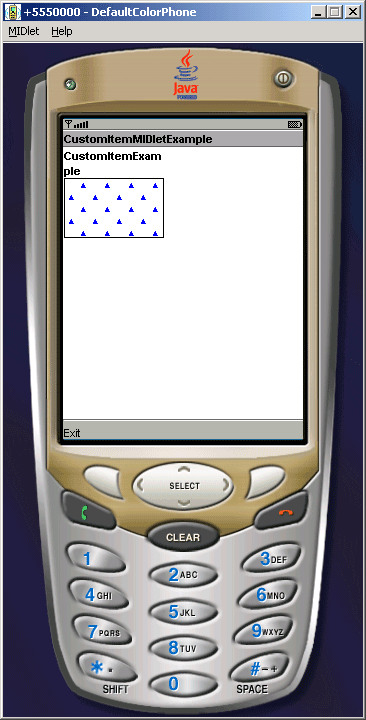
In J2ME applications, Custom Items can be created by programmers and they can also set their look and feel as these custom item have their own method called paint(). Also CustomItem is a extendable class, and extends the Item class itself. Using custom items you can create and add as many items as you want in your J2ME applications. In this Midlet, we have tried to do the same thing.
Please don't forget to include javax.microedition.lcdui package into you application.
Output of the CustomItem Midlet
Source Code of CustomItemMIDletExample.java
import javax.microedition.midlet.*;
import javax.microedition.lcdui.*;

public class CustomItemMIDletExample extends MIDlet implements CommandListener{
  private Form form;
  private Command exit;
  private Display display;
  private CustomItemExample customItem;

  public CustomItemMIDletExample(){
  form = new Form("CustomItemMIDletExample");
  exit = new Command("Exit", Command.EXIT, 0);
  form.append(new CustomItemExample("CustomItemExample"));
  form.addCommand(exit);
  form.setCommandListener(this);
  }

  public void startApp(){
  display = Display.getDisplay(this);
  display.setCurrent(form);
  }

  public void pauseApp(){}

  public void destroyApp(boolean unconditional){}

  public void commandAction(Command c, Displayable s){
  if(c.getCommandType() == Command.EXIT)
  notifyDestroyed();
  }
}

class CustomItemExample extends CustomItem{
  public CustomItemExample(String title){
  super(title);
  }

  public int getMinContentWidth(){
  return 100;
  }

  public int getMinContentHeight(){
  return 60;
  }

  public int getPrefContentWidth(int width){
  return getMinContentWidth();
  }

  public int getPrefContentHeight(int height){
  return getMinContentHeight();
  }

  public void paint(Graphics g, int w, int h){
  g.drawRect(0, 0, w - 1, h - 1);
  g.setColor(0, 0, 255);
  int offset = 0;
  for (int y = 4; y < h; y += 12){
  offset = (offset + 12) % 24;
  for (int x = 7; x < w; x += 24){
  g.fillTriangle(x + offset, y, x + offset - 3, y + 6, x + offset + 3, y + 6);
  }
  }
  }
}