Frameworks| Hibernate| Struts| JSF| JavaFX| Ajax| Spring| DOJO| JDO| iBatis| Questions?


Search Tutorials

Latest Questions
Comments
 
Dojo SplitContainer 
 

In this section, you will learn about the dojo SplitContainer.


Dojo SplitContainer


In this section, you will learn about the dojo SplitContainer.

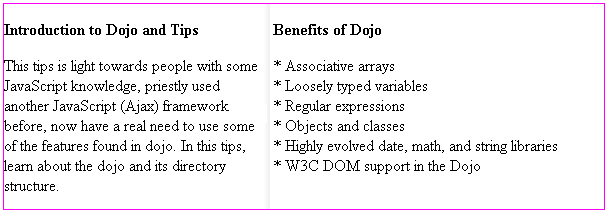
SplitContainer: This is also a container that contains multiple children widgets. All are displayed side by side (horizontally or vertically). There is a bar between each of the children, and you can adjust the relative size of each child by dragging the bars. You must specify the size (width and height) for the dojo SplitContainer.

Try Online: SplitContainer


Here is the code of SplitContainer Example:

<html>
<head>

<title>SplitContainer Example</title>
    <style type="text/css">
        @import "../dijit/themes/tundra/tundra.css";
        @import "resources/dojo.css"
    </style>

    <script type="text/javascript" src="dojo.xd.js" djConfig="parseOnLoad: true"></script>
    <script type="text/javascript">
       dojo.require("dojo.parser");
       dojo.require("dijit.layout.SplitContainer");
       dojo.require("dijit.layout.ContentPane");
     </script>

</head>
<body class="tundra">

        <div dojoType="dijit.layout.SplitContainer" orientation="horizontal" 
sizerWidth=
"10" activeSizing="true"
                style="border: 1px solid #FF00FF; width: 600px; height: 205px;">

                <div dojoType="dijit.layout.ContentPane" sizeMin="10" sizeShare="10">
                    <p><b>Introduction to Dojo and Tips</b></p>
                    
                       This tips is light towards people with some JavaScript knowledge,
 priestly used another JavaScript 
(Ajaxframework before, now have a real need to use 
some of the features found in dojo. In 
this tips, learn about the dojo and its directory 
structure.

                       
                </div>
                <div dojoType="dijit.layout.ContentPane" sizeMin="10" sizeShare="10">
                    <p><b>Benefits of Dojo</b></p>
                    
                            *  Associative arrays<br>
              * Loosely typed variables<br>
              * Regular expressions<br>
              * Objects and classes<br>
              * Highly evolved date, math, and string libraries<br>
              * W3C DOM support in the Dojo

                       
                </div>
        </div>

</body>
</html>

Output of the SplitContainer Example:
 

Try Online:


Leave your comment:

Name:

Email:

URL:

Title:

Comments:


Enter Code:

Audio Version
Reload Image
 

Note: Emails will not be visible or used in any way, and are not required. Please keep comments relevant. Any content deemed inappropriate or offensive may be edited and/or deleted.

No HTML code is allowed. Line breaks will be converted automatically. URLs will be auto-linked. Please use BBCode to format your text.

Add This Tutorial To:
  Del.icio.us   Digg   Google   Spurl   Blink   Furl   Simpy   Y! MyWeb 
  JDO Tutorials
  EAI Articles
  Struts Tutorials
  Java Tutorials
  Java Certification

Tell A Friend
Your Friend Name
Search Tutorials


Browse all Java Tutorials
Java JSP Struts Servlets Hibernate XML
Ajax JDBC EJB MySQL JavaScript JSF
Maven2 Tutorial JEE5 Tutorial Java Threading Tutorial Photoshop Tutorials Linux Technology
Technology Revolutions Eclipse Spring Tutorial Bioinformatics Tutorials Tools SQL
 

Home | JSP | EJB | JDBC | Java Servlets | WAP  | Free JSP Hosting  | Search Engine | News Archive | Jboss 3.0 tutorial | Free Linux CD's | Forum | Blogs

About Us | Advertising On RoseIndia.net  | Site Map

India News

Send your comments, Suggestions or Queries regarding this site at roseindia_net@yahoo.com.

Copyright © 2007. All rights reserved.