Frameworks| Hibernate| Struts| JSF| JavaFX| Ajax| Spring| DOJO| JDO| iBatis| Questions?


Search Tutorials

Latest Questions
Comments
 
Dojo Auto completer 
 

In this section, you will learn how to create a auto completer in dojo.


Dojo Auto completer


In this section, you will learn how to create a auto completer in dojo. 

Try Online: Auto Completer

Auto Completer: The Auto Completer provides the front-end logic for text-entry suggestion and completion functionality. The features of the auto completer to control navigation of the suggestions container via up/down arrow keys and rich event model. Easily to configure its included parameters and custom formatting of auto completer suggestions, query delimiters (Multiple selections per input box), configurable query delay, type-ahead, animation of suggestions container, built-in query caching and much more.

The Combo Box is a hybrid between the combo box and text field. It provides a list of acceptable values. This is good for open-ended multiple choice questions.  Rather than having two fields - a combo box and an Other text box - you can use just one field.

Here is the code of Program:

<html>
  <head>
    <title>Auto Completer Combo</title>
      <style type="text/css">
        @import "../resources/dojo.css";
        @import "../dijit/themes/tundra/tundra.css";
      </style>

      <script type="text/javascript" src="dojo.xd.js"
        djConfig="parseOnLoad: true"></script>

      <!-- combo box -->
      <script type="text/javascript">
        dojo.require("dojo.parser");
        dojo.require("dijit.form.FilteringSelect");
      </script>
  </head>

  <body class="tundra">
    <h2>Auto Completer Combo box</h2>
    <select dojoType="dijit.form.FilteringSelect" name="sname" 
    autocomplete="false" value="Vinod">
      <option value="Vinod">Vinod</option>
      <option value="Vikash" >Vikash</option>
      <option value="Deepak" >Deepak</option>
      <option value="DeepakSir" >Deepak Sir</option>
      <option value="Arun" >Arun</option>
      <option value="Amar" >Amar</option>
      <option value="Aman" >Aman</option>
    </select>
  </body>
</html> 

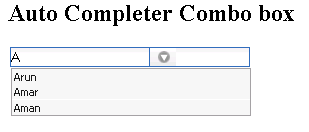
Output of Program:


Try Online:


» View all related tutorials
Related Tags: c dojo io accordion this ai container learn ear e il section in nt out j do s is ll

Leave your comment:

Name:

Email:

URL:

Title:

Comments:


Enter Code:

Audio Version
Reload Image
 

Note: Emails will not be visible or used in any way, and are not required. Please keep comments relevant. Any content deemed inappropriate or offensive may be edited and/or deleted.

No HTML code is allowed. Line breaks will be converted automatically. URLs will be auto-linked. Please use BBCode to format your text.

Add This Tutorial To:
  Del.icio.us   Digg   Google   Spurl   Blink   Furl   Simpy   Y! MyWeb 

Current Comments

2 comments so far (
post your own) View All Comments Latest 10 Comments:

auto complete code is not working on my machine.i pasted above code as it is.plz reply soon.

thnks.

Posted by madhu on Tuesday, 08.12.08 @ 12:53pm | #72468

Hello,

Very good and so helpful tutorial. Is it possible to do the same(autocompleter) with textbox instead of combobox. Please let me know the changes required

Posted by venkata on Monday, 07.7.08 @ 19:31pm | #66167

Training Courses
Tell A Friend
Your Friend Name
Software Solutions
Least Viewed
Most Rated
Recently Viewed
Search Tutorials


Home | JSP | EJB | JDBC | Java Servlets | WAP  | Free JSP Hosting  | Search Engine | News Archive | Jboss 3.0 tutorial | Free Linux CD's | Forum | Blogs

About Us | Advertising On RoseIndia.net  | Site Map

India News

Indian Software Development Company | iPhone Development Company in India | Flex Development Company in India | Java Training Delhi | Java Training at Noida |

Send your comments, Suggestions or Queries regarding this site at roseindia_net@yahoo.com.

Copyright © 2008. All rights reserved.