
Dojo Show and Hide Dialog


In this example, you will learn dojo show and hide dialog. In the following example, you will see there are two method that are used for showing and hiding the dialog box.
- show(): This method is used to display the dialog box.
- hide(): This method is used to hide the dialog box.
Try Online: Show and Hide Dialog
Here is the code:
<html>
<head>
<meta http-equiv="Content-Type" content="text/html; charset=UTF-8" />
<title>Show and hide Dialog example</title>
<style type="text/css">
@import "../dijit/themes/soria/soria.css";
@import "/resources/dojo.css";
</style>
<script type="text/javascript" src="dojo.js" djConfig="parseOnLoad: true"></script>
<script >
dojo.require("dojo.parser");
dojo.require("dijit.form.Button");
dojo.require("dijit.Dialog");
dojo.require("dijit.form.TextBox");
dojo.addOnLoad(showDialog);
dojo.addOnLoad(hideDialog);
function showDialog() {
dijit.byId('dialog1').show();
}
</script>
</head>
<body class="soria">
<div dojoType="dijit.Dialog" id="dialog1" title="Login">
<form action="Login" method="post" validate="true" id="loginForm">
<table width="258">
<tr>
<td><label>Login</label></td>
<td><input type="text" trim="true" dojoType="dijit.form.TextBox"
value="" name="login" id="userId"/></td>
</tr>
<tr >
<td><label>Password</label></td>
<td><input type="password" trim="true" dojoType="dijit.form.TextBox"
value="" name="password" id="password"/></td>
</tr>
<tr><td colspan="2"> </td></tr>
<tr>
<td colspan="2" align="center">
<table width="100%" border="0" cellspacing="0" cellpadding="0">
<tr>
<td align="center" valign="top" width="40%">
<!-- button ok -->
<button dojoType="dijit.form.Button" type="submit" id="LoginButton"
onClick="return validate();">Ok</button></td>
<td align="left" valign="top" width="3%"> </td>
<td align="left" valign="top" width="46%" >
<!-- button cancel -->
<button dojoType="dijit.form.Button" type="submit" onclick="document.Login.reset()"
id="Cancel">Cancel</button></td>
</td>
<td width="11%" align="left" valign="top"> </td>
<td><button dojoType="dijit.form.Button" type="submit" onclick="showDialog();"
id="resetPassword"> Show Dialog </button></td>
</tr>
</table>
</td>
</tr>
</table>
</form>
</div>
<!-- Forgot Password Form-->
<div dojoType="dijit.Dialog" id="dialog2" title="Forgot Password">
<form action="doResetPassword.action" method="post" validate="true"
id="resetPasswordForm">
<table width="308">
<tr>
<td colspan="2"><label>Enter Login Name</label></td>
<td><input type="text" trim="true" dojoType="dijit.form.TextBox"
value="" name="userName" id="userName"/></td>
</tr>
<tr><td><B>Or</B></td></tr>
<tr>
<td colspan="2"><label>Enter Your Email Address</label></td>
<td><input type="text" trim="true" dojotype="dijit.form.TextBox"
value="" name="email" id="email"/></td>
</tr>
<tr>
<td align="right">
<button dojoType="dijit.form.Button" type="submit" onclick="validate1()"
id="reset">Ok </button></td>
<td align="right" valign="top"><button dojoType="dijit.form.Button"
type="submit" onClick="hideDialog()" id="cancel1">Hide Dialog </button> </td></tr>
</table>
</form>
</div>
<script>
function validate(){
userId = document.getElementById('userId').value
password = document.getElementById('password').value
errMsg=" ";
if(userId == ""){
errMsg +="Please enter User Name\n";
}
if(password == ""){
errMsg +="Please enter Password" ;
}
if(errMsg!= " "){
alert(errMsg);
return false;
}
document.forms['loginForm'].submit();
}
</script>
<script>
function showDialog() {
dijit.byId('dialog1').hide();
var dlg = dijit.byId('dialog2');
dlg.show();
}
function validate1(){
userName = document.getElementById('userName').value
email = document.getElementById('email').value
errMsg=" ";
if(userName == "" && email == ""){
errMsg +="Please enter userName Or email address\n";
}
var reg = /^([A-Za-z0-9_\-\.])+\@([A-Za-z0-9_\-\.])+\.([A-Za-z]{2,4})$/;
if (!(email == "")){
if(reg.test(email) == false) {
errMsg+='Invalid Email Address';
}
}
if(errMsg!= " "){
alert(errMsg);
return false;
}
document.forms['resetPasswordForm'].submit();
}
function hideDialog(){
var dlg = dijit.byId('dialog2');
dlg.hide();
dijit.byId('dialog1').show();
}
</script>
</body>
</html>
Output:
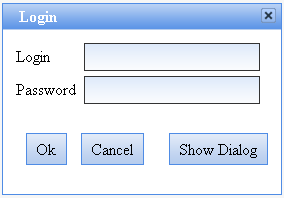
If you click on the "Show Dialog" Command button then you get:
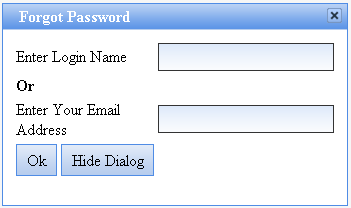
Try Online: 