
Dojo Color Picker


In this section, you will learn about the dojo ColorPicker.
ColorPicker: The dojox.widget.ColorPicker widget that allows user to select a color (in hexa format). This is a form component. We can add this component on the form to our requirement.
Try Online: Color Picker
Here is the code of Program:
<html>
<head>
<title>Color Picker Example</title>

  <style type="text/css">
  @import "../dijit/themes/soria/soria.css";
  @import "/resources/dojo.css";
  @import "../dojox/widget/ColorPicker/ColorPicker.css";

  </style>

  <script type="text/javascript" src="dojo.js" djConfig="parseOnLoad: true"></script>

  <script type="text/javascript">
  dojo.require("dojox.widget.ColorPicker");
  dojo.require("dojo.parser");

  </script>
</head>

<body class="soria">
  <b>Please select the color:</b>
  <div id="colorPicker" dojoType="dojox.widget.ColorPicker"></div>

</body>
</html>
Output:
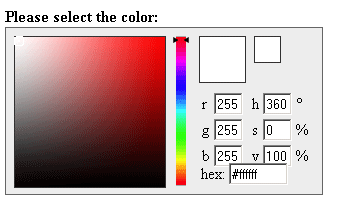
Try Online: 