Services | Updates | Contact
Home | Ajax | BioInformatics | Dojo | EAI | EJB | Hibernate | J2ME | Java | Java Glossary | Java Servlets | JavaScript | Jboss | JDBC | JDO | Jmeter | JSF | JSP | JUnit | Maven | MySQL | Spring Framework | SQL | Struts | Technology | WAP | Web Services | XML
Search All Tutorials
Top Search: Loan Struts Open Source
Snooping the server
In this program we are going to tell you how can a use servlet to display information about its server.
 
Programming - Count Vowels - main
Write a program that reads a string and displays the number of vowels in it.
 
More Tutorials...

Programming Tutorials: Ajax | Articles | JSP | Bioinformatics | Database | Free Books | Hibernate | J2EE | J2ME | Java | JavaScript | JDBC | JMS | Linux | MS Technology | PHP | RMI | Web-Services | Servlets | Struts | UML


Dojo
Comments


Dojo Radio Button


In this section, you will learn how to create radio buttons in dojo. For creating radio button you need "dijit.form.CheckBox". The radio button do some action on press. 

Try Online: Radio Button

The RadioButton class is declared in the CheckBox.js file, hence you need dojo.require(dijit.form.CheckBox) for RadioButtons to work.

[Radio buttons are used when there is a list of two or more options that are mutually exclusive and the user must select exactly only one choice from a group of radio button. Click a non-selected radio button will deselect whatever other button was previously selected in the list.]

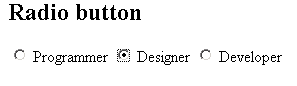
Radio Buttons are the same as html but dojo provides more controls and styling options than a conventional Radio button. The radio button also contains Boolean types value either 'true' or 'false'. The following example creates a Radio buttons:

Here is the code of Program:

<html>
  <head>
    <title>Radio</title>
    <!-- radio -->
    <script type="text/javascript">
      dojo.require("dojo.parser");
      dojo.require("dijit.form.*");
    </script>
  </head>

  <body>
    <h2>Radio button</h2>
    <input dojoType="dijit.form.RadioButton" id="val1" name="group1" 
          checked=
"checked" value="Programmer" type="radio" />
    <label for="val1"> Programmer </label>
    <input dojotype="dijit.form.RadioButton" id="val2"  name="group1" 
           
value="Designer" type="radio" />
    <label for="val2"> Designer </label>
    <input dojotype="dijit.form.RadioButton" id="val3"  name="group1" 
                      
value="Developer" type="radio" />
    <label for="val3"> Developer </label> 
  </body>
</html>

Output of Program:


Facing Programming Problem?
Add This Tutorial To:
  Del.icio.us   Digg   Google   Spurl   Blink   Furl   Simpy   Y! MyWeb 

Current Comments

0 comments so far (post your own) View All Comments Latest 10 Comments:

Leave your comment:

Name:

Email:

URL:

Title:

Comments:


Enter Code:


Note: Emails will not be visible or used in any way, and are not required. Please keep comments relevant. Any content deemed inappropriate or offensive may be edited and/or deleted.

No HTML code is allowed. Line breaks will be converted automatically. URLs will be auto-linked. Please use BBCode to format your text.

  EAI Articles
  Java Certification
Tell A Friend
Your Friend Name
Search Tutorials


Browse all Java Tutorials
Java JSP Struts Servlets Hibernate XML
Ajax JDBC EJB MySQL JavaScript JSF
Maven2 Tutorial JEE5 Tutorial Java Threading Tutorial Photoshop Tutorials Linux Technology
Technology Revolutions Eclipse Spring Tutorial Bioinformatics Tutorials Tools SQL
 

Home | JSP | EJB | JDBC | Java Servlets | WAP  | Free JSP Hosting  | Search Engine | News Archive | Jboss 3.0 tutorial | Free Linux CD's | Forum | Blogs

About Us | Advertising On RoseIndia.net  | Site Map

India News

Send your comments, Suggestions or Queries regarding this site at roseindia_net@yahoo.com.

Copyright © 2007. All rights reserved.