
Dojo AccordionContainer


In this section, you will learn about the dojo AccordionContainer.
AccordionContainer: We have already read about the container like: TabContainer and StackContainer. Similarly, this is a container that contains a set of panes. All pane titles are all visible, but only one pane's content is visible at a time. After clicking on the pane title currently slides are displayed.
Try Online: AccordionContainer
<html>
<head>
<title>Accordion Container Example</title>
  <style type="text/css">
  @import "../dijit/themes/tundra/tundra.css";
  @import "/resources/dojo.css"
  </style>
  <script type="text/javascript" src="dojo.xd.js" djConfig="parseOnLoad: true"></script>
  <script type="text/javascript">
 dojo.require("dojo.parser");
 dojo.require("dijit.layout.AccordionContainer");
 </script>
</head>
<body class="tundra">
  <div dojoType="dijit.layout.AccordionContainer" duration="80"
  style="margin-right: 10px; width: 500px; height: 200px;">

  <div dojoType="dijit.layout.AccordionPane" selected="true" title="Benefits of Dojo">
  <p >Benefits of Dojo: Associative arrays, Loosely typed variables,
Regular expressions, Objects and classes, Highly evolved date, math, and string libraries,
W3C DOM support in the Dojo.</p >
  </div>

  <div dojoType="dijit.layout.AccordionPane" title="Introduction to Dojo">
 <p>This tips is light towards people with some JavaScript knowledge,
priestly used another JavaScript (Ajax) framework before, now have a real need to use some of
 the features found in dojo.</p>
  </div>

  <div dojoType="dijit.layout.AccordionPane" title="WebSite for Dojo Tutorial">
 <p>If you want to learn dojo. Please go the following url and read the dojo
tutorials with running examples.
 URL: www.roseindia.net/dojo/</p>
  </div>
  </div>
</body>
</html>
Output:
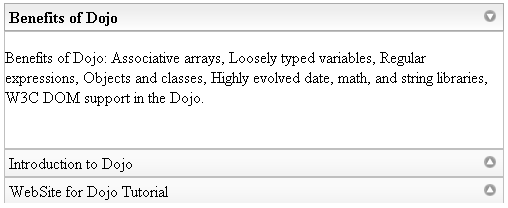
Try Online: 