--Ads--
Dojo Menu and Menu Item


In this section, you will learn about the menu and how
to create it in dojo.
Try Online: Menu
and Menu Item
Menu : This is the widget models a context menu,
otherwise known as a right-click or popup menu, and it appears in a ComboButton
and DropDownButton widgets. If you click on the right button of the mouse
then popup menu is appeared on the screen.
MenuItem widgets are an actual items in the menu. The
PopupMenuItem is a MenuItem, but it displays a submenu or other widget to the
right . A PopupMenuItems always have two child nodes: a tag with the displayed
label (Using SPAN tag), and a widget to be popped up, typically a dijit.Menu widget.
Here is code of program:
<html>

<head>

<title>Menu Demo</title>

  <style type="text/css">

  @import "../resources/dojo.css";

  @import "../dijit/themes/tundra/tundra.css";


  </style>

  <script type="text/javascript" src="dojo.xd.js"
   djConfig="parseOnLoad: true"></script>


  <script type="text/javascript">

 dojo.require("dojo.parser");

 dojo.require("dijit.form.Button");

 dojo.require("dijit.Menu");

 function call_function(choice) {

  alert(choice+" was clicked.");

  }

  function save_function() {

  alert("Save Button");

  }

  function save_as_function(choice) {

 alert("Save As Button");

  }

 </script>

</head>

<body class="tundra">

<b>Creating DropDownButtons</b><br>

<div dojoType="dijit.form.ComboButton" onclick="save_function">

  <span>File</span>

  <div dojoType="dijit.Menu" id="saveMenu"

   toggle="fade" style="display: none;">

  <div dojoType="dijit.MenuItem"

 iconClass="dijitEditorIcon dijitEditorIconSave"
onclick="save_function">

  Save

  </div>

  <div dojoType="dijit.MenuItem" onclick="save_as_function">

  Save As

  </div>

  </div>

  </div>

<div dojoType="dijit.form.DropDownButton">

  <span>Edit</span>

  <div dojoType="dijit.Menu" id="Edit">

  <div dojoType="dijit.MenuItem" label="Copy"

  onclick="call_function('copy');"></div>

  <div dojoType="dijit.MenuItem" label="Cut"

  onclick="call_function('cut');"></div>

  <div dojoType="dijit.MenuItem" label="Paste"

  onclick="call_function('paste');"></div>

  </div>

  </div>


<br><br><br><br><br><br>

<h1>Submenu</h1>

  <style>

  .myIcon {

 background-image:

  url

(http://o.aolcdn.com/dojo/1.0.0/dijit/themes/tundra/images/checkmark.gif);

 background-position: -16px 0px;

 width: 16px;

 height: 16px;

  }

  </style>


  <div dojoType="dijit.Menu" id="submenu1"

 contextMenuForWindow="true">

  <div dojoType="dijit.MenuItem" iconClass="myIcon"

 onClick="alert('Hello world');">Enabled Item</div>

  <div dojoType="dijit.PopupMenuItem" id="submenu2">

  <span>Submenu</span>

  <div dojoType="dijit.Menu">

  <div dojoType="dijit.MenuItem"

   onClick="alert('Submenu 1!')">

Submenu Item One</div>

  <div dojoType="dijit.MenuItem"

   onClick="alert('Submenu 2!')">

Submenu Item Two</div>

  </div>

  </div>

  </div>

</body>

</html>
|
Here is code of program:
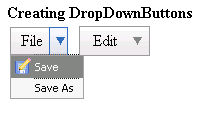
Submenu:
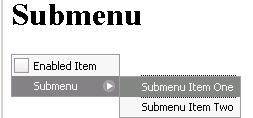
Try Online: 
