
Dojo drag and drop


In this section, you will learn about dojo drag and drop.
Drag and Drop: This is a technique of dragging an item. Click an object or specific item that have to be dragged and dropped, you hold down the mouse button and drag the object to the suitable destination.
Try Online: Drag and Drop
Here is the code of Program:
<html>
  <head>
  <title>Dojo Drag and Drop Example</title>

  <script type="text/javascript" src="dojo.js" djConfig="parseOnLoad: true">
  </script>
  <script type="text/javascript">
  dojo.require("dojo.dnd.source");
  dojo.require("dojo.parser");
  </script>
  </head>
<body>

  <h1>Drag and Drop</h1>
  <table border="1" cellpadding="0" cellspacing="0">
  <tr>
  <td valign="top">
  <!-- Source -->
  <div dojoType="dojo.dnd.Source" jsId="sourceData" class="source">
  <b style="background-color:#999999 ">Source Data</b>
  <div class="dojoDndItem" dndType="vinod">
  <div>Vinod</div>
  </div>
  <div class="dojoDndItem" dndType="suman">
  <div>Suman</div>
  </div>
  <div class="dojoDndItem" dndType="amar">
  <div>Amar</div>
  </div>
  <div class="dojoDndItem" dndType="ravi">
  <div>Ravi</div>
  </div>
  <div class="dojoDndItem" dndType="aman">
  <div>Aman</div>
  </div>
  <div class="dojoDndItem" dndType="deepak">
  <div><img src="1.jpg" /></div>
  </div>
  <div class="dojoDndItem" dndType="deepak">
  <div><img src="2.jpg" /></div>
  </div>
  </div>
  </td>
  <td valign="top">
  <!-- Target -->
  <div dojoType="dojo.dnd.Target" jsId="targetData" class="target"
accept="vinod,suman,amar,ravi,aman,deepak">
  <b style="background-color:#999999; ">Target Data</b>
  </div>
  </td>
  </tr>
  </table>

</body>
</html>
Output:
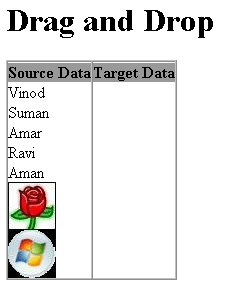
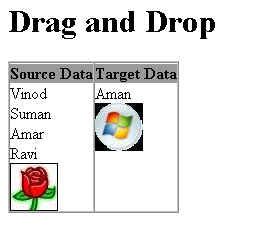
If you drag and drop the items, you get:
Try Online: 