In this Tutorial we want to describe you a code that help you in understanding JavaScript array Size.

JavaScript array size


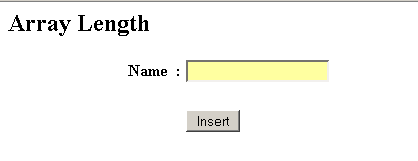
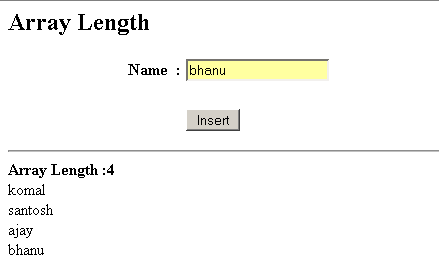
In this Tutorial we want to describe you a code that help you in understanding JavaScript array Size. The code shows you a HTML Page Array Length, The HTML Page include the name ,text field and a insert button. On clicking the insert button, a function push( ) and show( ) is invoked, The push method include the conditional operator if. This operator evaluate that if the value is equal to null ,a dialog box appear with the alert message "Name is empty". Otherwise the numbers of value entered by you is assigned to array [count].
The function show( ) include the variable string return you the length of an array. The for loop executes and run the script till the variable i is less than variable count. The concatenated value of str and array are assigned to a string.
1) document.getElementById - This method Returns you the element whose ID is given by.
JavaScript array size.html
<html>
    <head>
        <title>Array Length</title>
        <script>
            var array = new Array();
            var count = 0;
            function push(val){
                if(val=="")
                    alert("Name is empty")
                else {
                    array[count]=val;
                    count++;
                }
            }

            function show() {
var string="<hr><b>Array Length :</b><b>
"+array.length+"</b><br>";
for(i = 0; i < count; i++) {
string =string+array[i]+"<br>";
}
if(array.length > 0)
document.getElementById('myDiv').innerHTML = string;
}
</script>
</head>
<body>
<h2>Array Length</h2>
<form name="form1">
<table width="407">
<tr>
<td width="154" align="right"><b>Name</b></td>
<td width="9"><b> :</b></td>
<td width="224">
<input type="text" name="name"/></td>
</tr>
<tr>
<td width="154" align="right"> </td>
<td width="9"> </td>
<td width="224"> </td>
</tr>
<tr>
<td width="154" align="right"> </td>
<td width="9"> </td>
<td width="224">
<input type="button" Value=" Insert "
onclick="push(this.form.name.value),show();"/>
</td>
</tr>
</table>
</form>
<div id="myDiv"></div>
</body>
</html>
|
Output