
In this Tutorial we want to describe you a example code that helps in get a length of array.

Get Length of Array


In this Tutorial we want to describe you a example code that helps in get a length of array. For this we are using JavaScript language. The code create a HTML Page specifying a string ,spilt character with their respective text field and a spilt button. On click a spilt button, a push function is invoked. This function include a variable array that instantiate an array object, and include the method string. split.
string. spilt( ) - This method is used to break or spilt a string into a separate chunks. If we have a number like "1234568" and want to store each number separately, for this you need to specify the delimiter that enables you a break line after each number separately.
The splited string is stored in a variable string. The for loop run and execute the script till the variable i is less than array length. Finally the doument.getElementBy Id print the element of string variable on the basis of respective ID.
javascript array split.html
<html>
 <head>
  <title>Split Array</title>
   <script>
    var array = new Array();
      function push(string,chr){
var array= string.split(chr);
      var str = "<hr><b>Array :</b>"
      for(i=0;i<array.length;i++) {
        str=str+"<br>"+array[i];
          }
document.getElementById('myDiv').innerHTML = str;
}
</script>
</head>
<body>
<h2>Split Array</h2>
<form name="form1">
<table width="407">
<tr>
<td width="154" align="right"><b>String</b></td>
<td width="9"><b> :</b></td>
<td width="224">
<input type="text" name="string"/></td>
</tr>
<tr>
<td width="154" align="right"><b>Split Character</b></td>
<td width="9"><b> :</b></td>
<td width="224">
<input type="text" name="chr"/>
</td>
</tr>
<tr>
<td width="154" align="right"> </td>
<td width="9"> </td>
<td width="224">
<input type="button" Value=" Split "
onclick="push(this.form.string.value,this.form.chr.value);"/>
</td>
</tr>
</table>
</form>
<div id="myDiv"></div>
</body>
</html>
|
Output:
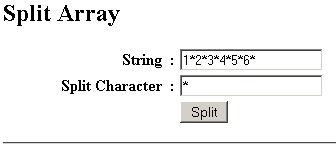
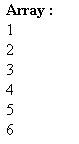
Download code