
In this Tutorial we want to describe you a code that help you in understanding JavaScript Array of checkboxes. For this we are using JavaScript as Script language.

JavaScript Array of checkboxes


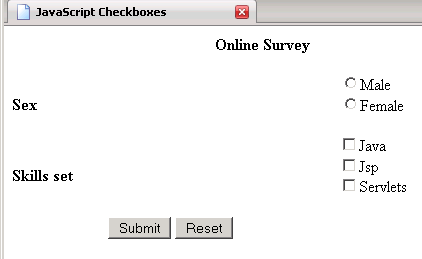
In this Tutorial we want to describe you a code that help you in understanding JavaScript Array of checkboxes. For this we are using JavaScript as Script language. In this example we make a HTML form that create two Radio Button., three Check Boxes. and two Radio Button. The validate function is used to validate the form Online Survey. The function validate( ) validates the form by if conditional operator. The if condition return you true only when any one of the radio button, check box is selected. In case the user do not select the radio button, check box, the submit button invoke the validate function and show you an alert message.
Buildingcheckboxes.html
|
<html> <head> <title>JavaScript Checkboxes</title> <script type="text/javascript"> function validate(form) { if (!document.form1.sex[0].checked && !document.form1.sex[1].checked){ alert("Please Select Sex"); return false;} var total="" for(var i=0; i < document.form1.scripts.length; i++){ if(document.form1.scripts[i].checked) total +=document.form1.scripts[i].value + "\n" } if(total==""){ alert("Please select scripts") } else alert ("Checkboxes you have selected are: "+"\n"+total) return false; } </script> </head> <body> <table border='0' width='50%' cellspacing='0' cellpadding='0' > <form name=form1 method=post onsubmit='return validate(this)'> <tr><th colspan="3" align="center">Online Survey<br><br></th> </tr> <tr> <td><b>Sex</b></td> <td> </td> <td> <input type=radio name=sex value='male'>Male <br> <input type=radio name=sex value='female'>Female<br><br> </td> </tr> <tr> <td><b>Skills set</b></td> <td> </td> <td> <input type=checkbox name=scripts value='Java'>Java <br> <input type=checkbox name=scripts value='Jsp'>Jsp<br> <input type=checkbox name=scripts value='Servlets'>Servlets<br> <br> </td> </tr> <tr><td align=center > <input type=submit value=Submit> <input type=reset value=Reset></td></tr> </form> </table> </body> </html> |
Output of the program
 |