JavaScript array class's slice() method returns the selected items or elements from the array according to the provided starting and ending index position. We can also use negative index for selecting the items from the end of the array.

JavaScript array slice


JavaScript array class's slice() method returns the selected items or elements from the array according to the provided starting and ending index position. We can also use negative index for selecting the items from the end of the array. Syntax of the slice() method is as follows:
| arrayObject.slice(StartIndex, EndIndex) |
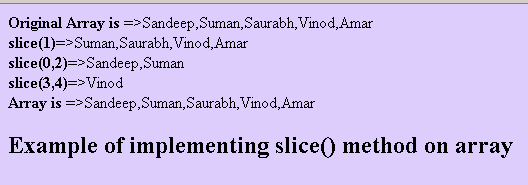
StartIndex tells that from where to start the selection and should be a number and it is must in the slice() method. EndIndex tells the ending position for selection and it is optional. If EndIndex is not provided into the slice() method then slice() selects all the elements from the starting index position. It does not modify the length of the array. Here into this example code we have created an array of length five and we have applied slice() method to familiarize you with some cases.
Full example code is as follows:
| <html> <head> <title> JavaScript array slice() example </title> <script type="text/javascript"> var arr = new Array(5); arr[0]="Sandeep"; arr[1]="Suman"; arr[2]="Saurabh"; arr[3]="Vinod"; arr[4]="Amar"; document.write("<b>Original Array is </b>=>"+arr+"<br>"); document.write("<b>slice(1)</b>=>"+arr.slice(1)+"<br> "); document.write("<b>slice(0,2)</b>=>"+arr.slice(0,2)+"<br> "); document.write("<b>slice(3,4)</b>=>"+arr.slice(3,4)+"<br> "); document.write("<b>Array is </b>=>"+arr+"<br>"); </script> </head> <body bgcolor="#ddcdfd"> <h2> Example of implementing slice() method on array </h2> </body> </html> |
Output: