In this Tutorial we want to describe you a code that helps you in understanding JavaScript array object reference.
JavaScript array object reference


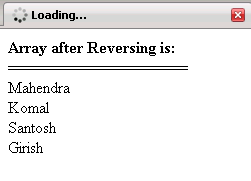
In this Tutorial we want to describe you a code that helps you in understanding JavaScript array object reference. For this we are using Java Scripting language. We declare an array variable that is used to instantiate array class. In order to set and access the value of the element in an array ,we must use index. The document.write print the element in an array object. The for loop execute the script till the variable i is less than length of an array. The document.print list of element in an array object On clicking the button the function function1 is invoked in which an array object call reverse method returns you the reverse order of the element in the array. and store in a variable c.The document.write print the Array after Reversing .For loop execute the script till the var i is less than length of var c.Finally the dcument.print print the element of an array in reverse order.
Javascript_array_object_reference.html
<html>
|
Output of the program