You can easily add two arrays to a single array with the use of concat() method.

JavaScript concat method example


You can easily add two arrays to a single array with the use of concat() method. This method uses the following syntax as given below:
resultedArray = oneArray.concat ( secondArray, thirdArray, ...);
The JavaScript array concat() method takes two or more values and adds them to the end of array. Here in this example code we have created two array object "firstArray" and "secondArray". firstArray contains three elements and secondArray contains two elements.
var firstArray = new Array(3);
firstArray[0]="Rose";
firstArray[1]="India";
firstArray[2]="Technologies";
var secondArray = new Array(2);
secondArray[0]="Private";
secondArray[1]="Limited";
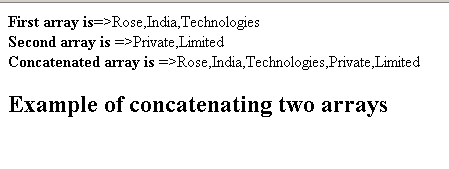
Now we have concatenated these two arrays to produce the final concatenated array finalArray which will be having five elements. Here is the code of example :
| <html> <head> <title>JavaScript array concat() example</title> <script type="text/javascript"> var firstArray = new Array(3); firstArray[0]="Rose"; firstArray[1]="India"; firstArray[2]="Technologies"; var secondArray = new Array(2); secondArray[0]="Private"; secondArray[1]="Limited"; var finalArray = firstArray.concat(secondArray); document.write("<b>First array is</b>=>"+firstArray+"<br> "); document.write("<b>Second array is</b> =>"+secondArray+"<br> "); document.write("<b>Concatenated array is</b> =>"+finalArray+"<br> "); </script> </head> <body> <h2> Example of concatenating two arrays </h2> </body> </html> |
Output: