
In this Tutorial we want to describe you a code that makes you to understand array reset.

JavaScript array replace element


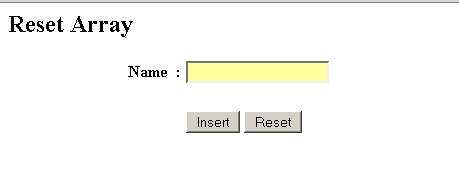
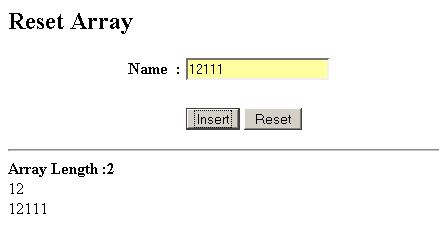
In this Tutorial we want to describe you a code that makes you to understand array reset. The code create you a HTML Page specifying name, text field and two button i.e. Insert and Reset. On click a insert button push ( ) and show ( ) function is invoked. The push function include a conditional loop if i.e., in case the value is null, alert box show you a message 'Name is empty', Otherwise the value entered by you in a text field is assigned to array. The count variable count the number of element inserted. The show function include an array .length( ) return you the length of an element in array. The for loop run and execute the script till variable i is less than count. The string concatenated with array and assigned to a variable string. If the length of array is greater than zero, the document.getElementById return you the element in the string on the basis of respective Id.
On click a Reset button, a reset function ( ) is invoked, this function
erase or reset the value inserted by you.
JavaScript array reset.java
<html>
<head>
<title>Reset Array</title>
<script>
var array = new Array();
var count = 0;
var string;
function push(val){
if(val=="")
alert("Name is emplty")
else {
array[count]=val;
count++;
}
}
function show() {
string="<hr><b>Array Length :</b><b>"+array.length+"</b><br>";
for(i = 0; i < count; i++) {
string =string+array[i]+"<br>";
}
if(array.length > 0)
document.getElementById('myDiv').innerHTML = string;
}
function resetFunction(){
array=[];
count = 0;
string="";
document.getElementById('myDiv').innerHTML = string;
}
</script>
</head>
<body>
<h2>Reset Array</h2>
<form name="form1">
<table width="407">
<tr>
<td width="154" align="right"><b>Name</b></td>
<td width="9"><b> :</b></td>
<td width="224">
<input type="text" name="name"/></td>
</tr>
<tr>
<td width="154" align="right"> </td>
<td width="9"> </td>
<td width="224"> </td>
</tr>
<tr>
<td width="154" align="right"> </td>
<td width="9"> </td>
<td width="224">
<input type="button" Value=" Insert "
onclick="push(this.form.name.value),show();"/>
<input type="button" Value=" Reset "
onclick="resetFunction();"/>
</td>
</tr>
</table>
</form>
<div id="myDiv"></div>
</body>
</html>
Output
Download code
