Core Java| JSP| Servlets| XML| EJB| JEE5| Web Services| J2ME| Glossary| Questions?

Hot Searches
struts-config.xml  web.xml  Java date format  read/write text file using javascript  ArrayList  Insert Data into Database Using Hibernat  create text file using java  insert data to text file using java  Visual Basic Date and Time Display the t  Create table and insert data by sql quer 

  JDO Tutorials
  EAI Articles
  Struts Tutorials
  Java Tutorials
  Java Certification
  Java Applet
Questions
Comments

J2ME Crlf Example


The given J2ME Midlet, discuss about how to show the messages in different line and row. In this example we have created an object called clrf that is further used to break line and row to show the message in correct readable format.


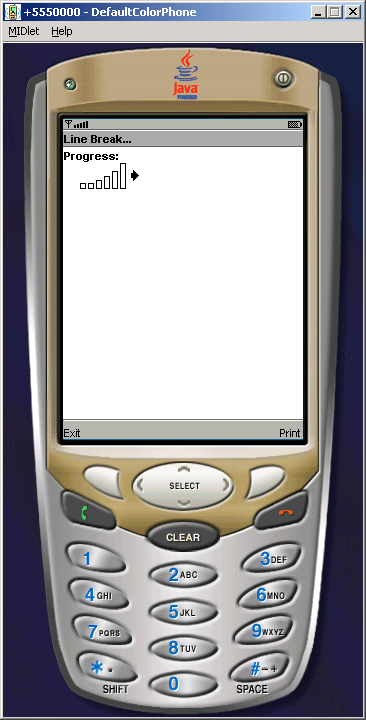
This mdlet is going to be look like as give image..
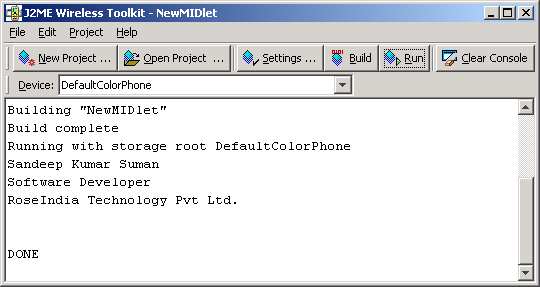
You can print the predefined messages on the consol by selecting print command. The message will be displayed as follow.. 
Source Code of LineBreakExample.java

import javax.microedition.midlet.*;
import javax.microedition.lcdui.*;
import javax.microedition.io.*;
import java.io.*;
 
public class LineBreakExample extends MIDlet implements Runnable, CommandListener{
  private final String CrLf = "\r\n";    
    private Form form;
    private Gauge gauge;
    private Command exit;
    private Command print;
    
    public LineBreakExample(){
        form = new Form("Line Break...");
        gauge = new Gauge("Progress:", true, 1000);
        form.append(gauge);        
        exit = new Command("Exit", Command.EXIT, 0);
        print = new Command("Print", Command.SCREEN, 0);
        form.addCommand(exit);
        form.addCommand(print);        
        form.setCommandListener(this);
    }
    
    public void startApp() {
        Display.getDisplay(this).setCurrent(form);
    }
    
    public void pauseApp() {
    }
    
    public void destroyApp(boolean unconditional){
    notifyDestroyed();
  }
    
    public void run() {
        lineBreak();
    }    
    
    private void lineBreak(){
    String message = "";
    message += "Sandeep Kumar Suman" + CrLf;
    message += "Software Developer" + CrLf;
    message += "RoseIndia Technology Pvt Ltd." + CrLf;
    message += CrLf;

    System.out.println(message);
    System.out.println("DONE");
  }
  
  public void commandAction(Command command, Displayable displayable){
    if(command == exit){
      destroyApp(true);
    }else if(command == print){
      new Thread(this).start();
    }
  }    
}


Download Source Code


Leave your comment:

Name:

Email:

URL:

Title:

Comments:


Enter Code:

Audio Version
Reload Image
 

Note: Emails will not be visible or used in any way, and are not required. Please keep comments relevant. Any content deemed inappropriate or offensive may be edited and/or deleted.

No HTML code is allowed. Line breaks will be converted automatically. URLs will be auto-linked. Please use BBCode to format your text.

Add This Tutorial To:
  Del.icio.us   Digg   Google   Spurl   Blink   Furl   Simpy   Y! MyWeb 
Tell A Friend
Your Friend Name


Home | JSP | EJB | JDBC | Java Servlets | WAP  | Free JSP Hosting  | Search Engine | News Archive | Jboss 3.0 tutorial | Free Linux CD's | Forum | Blogs

About Us | Advertising On RoseIndia.net  | Site Map

India News

Indian Software Development Company | iPhone Development Company in India | Java Training Delhi | Java Training at Noida |

Send your comments, Suggestions or Queries regarding this site at roseindia_net@yahoo.com.

Copyright © 2008. All rights reserved.