Core Java| JSP| Servlets| XML| EJB| JEE5| Web Services| J2ME| Glossary| Questions?

Hot Searches
struts-config.xml  web.xml  Java date format  read/write text file using javascript  ArrayList  Insert Data into Database Using Hibernat  create text file using java  insert data to text file using java  Visual Basic Date and Time Display the t  Create table and insert data by sql quer 

  JDO Tutorials
  EAI Articles
  Struts Tutorials
  Java Tutorials
  Java Certification
  Java Applet
Questions
Comments

J2ME Item State Listener Example


In this application we are going to shows how to implement the ItemStateListener interface in the j2me midlet. The ItemStateListener interface is used by applications which need to receive events that indicate changes in the internal state of the interactive items within a Form screen. The ItemStateListener interface having only one method that is:

itemStateChanged(Item item):- This is the void type method which called when internal state of an Item has been changed by the user.

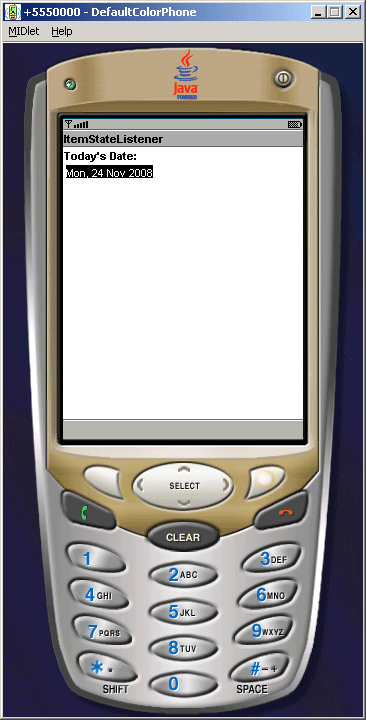
By this example you can learn the implementation of ItemStateListener in only three easy steps:

  1. In the first step we create the DateField and set the current date with this field as shown in figure.


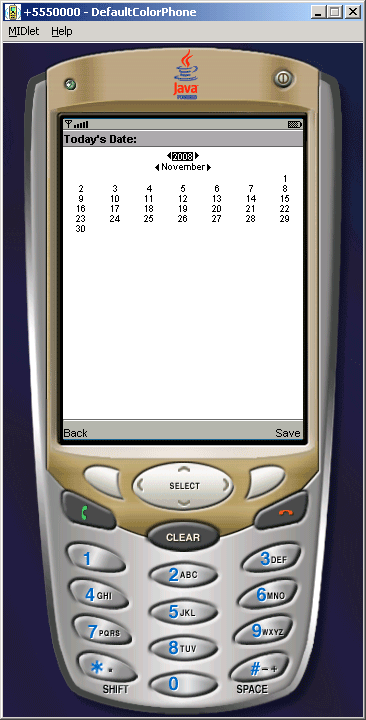
 2. In the second step click on select button then the calendar will be display as shown below.  
 

 3. And finally choose the new date and click on "Save" then the new date will display on the mobile window as shown.


ItemStateListenerMIDlet.java

import java.util.*;
import javax.microedition.lcdui.*;
import javax.microedition.midlet.*;

public class ItemStateListenerMIDlet extends MIDlet{
  private Display display;
  private Form form;
  private Date date = new Date();
  private Calendar calendar;
  private DateField today;

  public ItemStateListenerMIDlet(){
    display = Display.getDisplay(this);
  }

  public void startApp(){
        form = new Form("ItemStateListener");
        ItemStateListener listener = new ItemStateListener(){
      Calendar calendar = Calendar.getInstance(TimeZone.getDefault());

      public void itemStateChanged(Item item){
        calendar.setTime(((DateField)item).getDate());
      }
    };
    form.setItemStateListener(listener);        
        today = new DateField("Today's Date:", DateField.DATE);
        today.setDate(date);
        form.append(today);
        display.setCurrent(form);
    }

  public void pauseApp(){
        display = null;
    }

  public void destroyApp(boolean unconditional){
        notifyDestroyed();
    }
}


Download Source Code


Leave your comment:

Name:

Email:

URL:

Title:

Comments:


Enter Code:

Audio Version
Reload Image
 

Note: Emails will not be visible or used in any way, and are not required. Please keep comments relevant. Any content deemed inappropriate or offensive may be edited and/or deleted.

No HTML code is allowed. Line breaks will be converted automatically. URLs will be auto-linked. Please use BBCode to format your text.

Add This Tutorial To:
  Del.icio.us   Digg   Google   Spurl   Blink   Furl   Simpy   Y! MyWeb 
Join and Excel yourself with our Online instructor led training sessions
Integrated Struts 2 Hibernate and JPA Training
Java Training
Hibernate Training
JPA Training
JSF Training
Spring Framework Training
Struts 2 Training
EJB 3 Training
PHP Training
Junit Training
DbUnit Training
Ajax Training
IBM Websphere Training
Design Patterns Training
Weblogic Training
Tomcat Training
JMS Training
Jboss Training
Servlet Training
JSP Training
JavaFX Training
SQL Server Training
TPTP Training
Tell A Friend
Your Friend Name


Home | JSP | EJB | JDBC | Java Servlets | WAP  | Free JSP Hosting  | Search Engine | News Archive | Jboss 3.0 tutorial | Free Linux CD's | Forum | Blogs

About Us | Advertising On RoseIndia.net  | Site Map

India News

Indian Software Development Company | iPhone Development Company in India | Java Training Delhi | Java Training at Noida |

Send your comments, Suggestions or Queries regarding this site at roseindia_net@yahoo.com.

Copyright © 2008. All rights reserved.