
J2ME Animation using repaint( ) method


In this part of J2ME Image Tutorial, we are going to show you how to create an Image with animation. Here we have create a class called ImageAanimation that extends MIDlet and implements the CommandListner class. We have also used the predefined Canvas class to show the animation and image. For this, we have created a ImageCanvas2 class that extends the Canvas class to draw the animation and blink the image for a given period of time. To draw the image we are using the following methods:
- image = Image.createImage("/cartoondog.png");
- frame_width = image.getWidth();
- frame_height = image.getHeight();
And when image created then we can appear this image using this methods:
while(run_thread){
|
The Application is as follows:
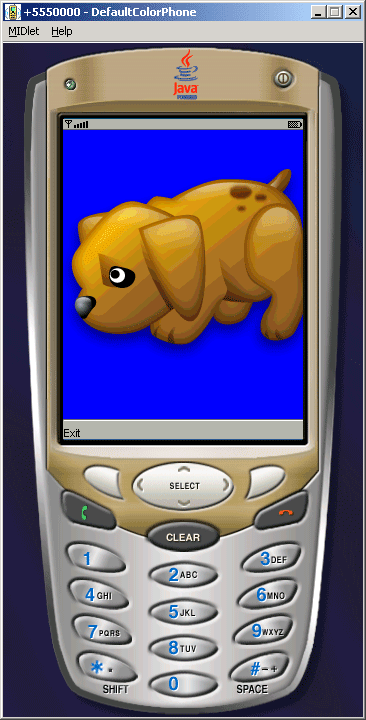
Source Code ImageAnimation.java
import javax.microedition.midlet.*;
import javax.microedition.lcdui.*;
public class ImageAnimation extends MIDlet implements CommandListener{
private Display display;
private Command exit;
protected void startApp(){
display = Display.getDisplay(this);
ImageCanvas2 canvas = new ImageCanvas2();
exit = new Command("Exit", Command.EXIT, 1);
canvas.addCommand(exit);
canvas.setCommandListener(this);
display.setCurrent(canvas);
}
protected void pauseApp(){}
protected void destroyApp(boolean unconditional){
notifyDestroyed();
}
public void commandAction(Command c, Displayable d){
String label = c.getLabel();
if(label.equals("Exit")) {
destroyApp(true);
}
}
}
class ImageCanvas2 extends Canvas implements Runnable{
int Frame_Count = 17;
int Frame_Hold = 70000;
int Last_Frame_Count = 300;
int[] position = {
0, 50, 186, 372, 558, 744, 930, 1024, 1024,
834, 651, 465, 279, 93, 0, 0, 0};
private Image image;
int frame_width = 0;
int frame_height = 0;
int frame_index = 0;
int run_length = 0;
boolean run_thread = false;
protected void showNotify(){
try{
image = Image.createImage("/cartoondog.png");
frame_width = image.getWidth();
frame_height = image.getHeight();
} catch (Exception ioe) {
return;
}
run_length = getWidth() - frame_width;
run_thread = true;
frame_index = 0;
new Thread(this).start();
}
protected void hideNotify(){
run_thread = false;
}
public void run(){
try{
while(run_thread){

 Thread.sleep((frame_index == Frame_Count - 1) ?

         Last_Frame_Count : Frame_Hold);

 int last_frame_index = frame_index;

 frame_index = (frame_index + 1) % Frame_Count;

 int repaint_left = position[last_frame_index];

 int repaint_right = position[frame_index];


 if(position[last_frame_index] > position[frame_index]){

 repaint_left = position[frame_index];

 repaint_right = position[last_frame_index];

 }

 repaint_left = (repaint_left * run_length) >> 10;

 repaint_right = (repaint_right * run_length) >> 10;

 repaint(repaint_left, 0, frame_width + repaint_right -

         repaint_left, frame_height);

      }
}catch(Exception e){}
}
public void paint(Graphics g){
g.setColor(0, 0, 255);
g.fillRect(0, 0, getWidth(), getHeight());
g.translate((position[frame_index] * run_length) >> 10, 0);
g.clipRect(0, 0, frame_width, frame_height);
g.drawImage(image, 0, -(frame_index * frame_height),
Graphics.LEFT + Graphics.TOP);
}
}