
List in J2ME


J2ME Canvas List Example will explain you, how to create list of items. In this example we are going to create a simple list of text, that will show the selected item on the same screen. In the example you can see that we have created a class and then a constructor of the same class. In the constructor we defined the list and added some items into it..
Syntax for creating a list
public CanvasListExample() {
|
You can add any number of elements into it using list.append ()
The simple list application will look like as follow..
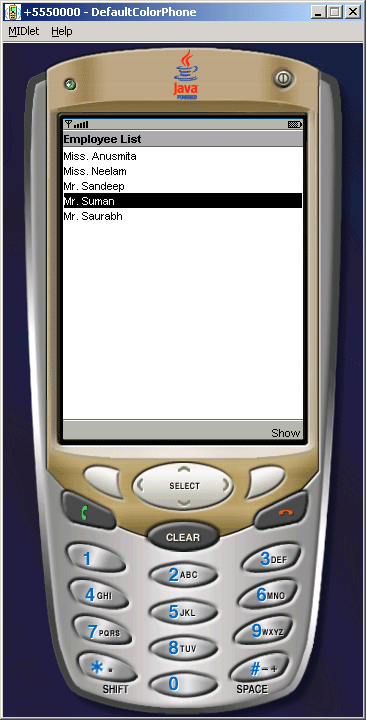
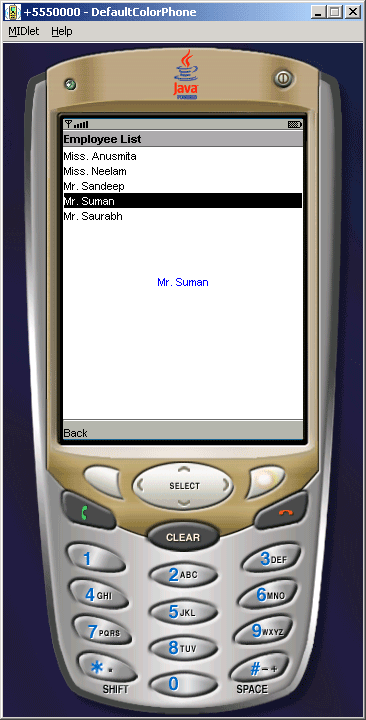
Source Code of CanvasListExample.java
import javax.microedition.midlet.*;
import javax.microedition.lcdui.*;
public class CanvasListExample extends MIDlet implements CommandListener{
private Display display;
private CanvasList canvas;
private List list;
private Command show;
  public CanvasListExample() {

  canvas = new CanvasList();

  list = new List("Employee List", Choice.IMPLICIT);

  show = new Command("Show", Command.OK, 1);

  list.append("Miss. Anusmita", null);

  list.append("Miss. Neelam", null);

  list.append("Mr. Sandeep", null);

  list.append("Mr. Suman", null);

  list.append("Mr. Saurabh", null);

  list.addCommand(show);

  display = Display.getDisplay(this);

  }
public void startApp(){
list.setCommandListener(this);
display.setCurrent(list);
}
public void pauseApp() {}
public void destroyApp(boolean unconditional){
notifyDestroyed();
}
public void commandAction(Command c, Displayable d){
String label = c.getLabel();
if(label.equals("Show")){
display.setCurrent(canvas);
}
}
class CanvasList extends Canvas implements CommandListener{
private Image image;
private Command back;
public CanvasList(){
back = new Command ( "Back", Command.BACK, 1);
addCommand (back);
setCommandListener (this);
}
public void paint(Graphics g){
int width = getWidth();
int height = getHeight();
String str = list.getString(list.getSelectedIndex());
g.setColor(0, 0, 255);
g.drawString(str, width/2, height/2, Graphics.HCENTER | Graphics.TOP);
}
public void commandAction(Command c, Displayable d){
String label = c.getLabel();
if(label.equals("Back")){
display.setCurrent(list);
}
}
}
}