JavaScript setAttributeNode method


In JavaScript method setAttributeNode method is used to add a new attribute node to the specified element.
Syntax:
| element.setAttributeNode( attribute_name ); |
Where element is that element object reference whose attribute node is to be set and attribute_name is the name of the attribute node which we want to set with some specific value. If the attribute with the attribute_name already exists then it replaces the older value with the new one.
Description of code:
To illustrate the use of setAttributeNode(), in our example we have created a <div> element with the id "mainDiv". Suppose we want to add a new attribute "align" to this div. To set the div element with the "align" node attribute we will use setAttributeNode() method. We also have created one button here which calls the function alignDiv() as defined in between a pair of <script></script> tags.
  function alignDiv() {
      var div = document.createAttribute("align");
      div.nodeValue = "center";
      document.getElementById("mainDiv").setAttributeNode(div);
   }
|
In the above function, first two lines are used to create a new attribute "align" with the value "center". Then after we will take the element object reference of the "mainDiv" element to call setAttributeNode(). It will set the attribute node "align" with the value "center" of "mainDiv" element.
Here is the full HTML code as follows:
<html>
<head>
 <script language="JavaScript">
   function alignDiv() {
      var div = document.createAttribute("align");
      div.nodeValue = "center";
      document.getElementById("mainDiv").setAttributeNode(div);
   }
 </script>
</head>
<body>
<div style="background: #ff9900; width:'100%';"
               align="center">
  <font color="#0000ff" size="12pt">
	<b>setAttributeNode Example</b>
  </font>
 </div>
  <div id="mainDiv" style="background: #ccccff; border:outset">
	<p>Welcome to RoseIndia</p>
  </div>
  <center>
   <p>
   <input type="button" value="Align div to center"
       onclick="alignDiv();this.disabled='true'">
   </p>
   </center>
</body>
</html>
|
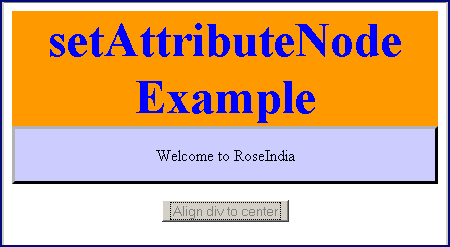
Output :
Click on the button "Align div to center" to align div's content to the center.

You can see from the following output that div's content is aligned to the center since we have added an attribute node "align" to this div and assign it with the value "center".