
JavaScript add row to table


This section illustrates you how to add a new row to the existing table using JavaScript.
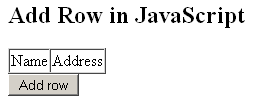
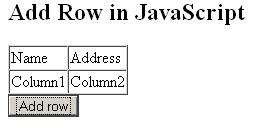
You can see in the given example, we have created a table whose id is grabbed by the method document.getElementById(id) and stored it into the variable 'tbody'. The method createElement() creates the row element 'tr' and 'td'. As you already know that 'td' contains the table data and 'tr 'defines a row that contains the 'td' element. Now, the method appendChild(document.createTextNode()) adds the text node to the 'td' element as the table data. Then we have added the 'td' data to the row element 'tr'. When you load the page, you will get the table containing the columns Name and Address and a button 'Add row'. On clicking the button, a new row will be added to the table.
Here is the code:
|
<html> |
Output will be displayed as:
On clicking the button, a new row is added to the table:
Tutorials
- JavaScript method doScroll()
- Popup Window Example in JavaScript
- JavaScript method deleteRow()
- JavaScript Variables and Data types
- Java Script Code of Calendar and Date Picker or Popup Calendar
- JavaScript - JavaScript Tutorial
- Looping In Java Script
- What is JavaScript? - Definition
- Conditional Examples(if - else- switch case) in JavaScript
- Classes-Objects in JavaScript
- String Number Operations in JavaScript
- Conditions In Java Script
- JavaScript - JavaScript Tutorial
- JavaScript Object Oriented Feature
- Form Validation using Regular Expressions is JavaScript
- Navigation with Combo box and Java Script
- Simple Calculator Application In Java Script
- JavaScript Combo Box Validation
- JavaScript createPopup method
- JavaScript appendChild method
- JavaScript add method
- JavaScript addImport example
- JavaScript appendData method
- JavaScript applyElement method Example
- JavaScript blink method
- JavaScript bold method
- JavaScript clear method
- JavaScript clearTimeOut method
- JavaScript click method
- JavaScript cloneNode example
- JavaScript createAttribute method
- JavaScript createCaption method
- JavaScript createComment method
- JavaScript createEventObject method
- JavaScript createTFoot method
- JavaScript createTHead method
- JavaScript deleteCaption method
- JavaScript deleteTFoot method
- JavaScript deleteTHead method
- JavaScript dragDrop method