
JavaScript XML Http Request
|
|
This section illustrates you how to access XML file with an XMLHTTP object using JavaScript.
The XMLHttpRequest object allows to update a web page without reloading. It requests and receives the data from the server after the page has loaded. In the given example, we have created XMLHttpRequest object and used it with the method open("GET", url, true) to make a GET request for the given url 'data.xml'. It provides readyState property of XMLHttpRequest to get the state of the response. For example, the value 4 indicates that the load is completed. The property responseText contains the server response which allows to display the node values of XML file.
Here is the data.xml:
| <Company> <Employee> <name>Angelina</name> <address>Rohini,Delhi</address> <designition>Engineer</designition> </Employee> </Company> |
Here is the code:
| <html> <h2>XML HTTP Request</h2> <script type="text/javascript"> function include(url,id) { var xmlhttp = false; if (!xmlhttp && typeof XMLHttpRequest!='undefined') { xmlhttp = new XMLHttpRequest(); } else if (window.ActiveXObject) { xmlhttp=new ActiveXObject("Microsoft.XMLHTTP"); } xmlhttp.open("GET", url,true); xmlhttp.onreadystatechange=function() { if (xmlhttp.readyState==4) { document.getElementById(id).innerHTML = xmlhttp.responseText; } } xmlhttp.send(null) } </script> <body onload="include('data.xml', 'div')";> <b>Employee's Information:</b> <div id='div'></div> </body> </html> |
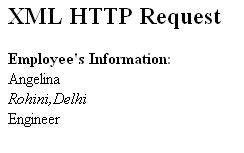
Output will be displayed as:


Tutorials
- Clear cookie example
- JavaScript getElementById innerHTML
- JavaScript getElementById Style
- Javascript Examples
- JavaScript add row dynamically to table
- New Page 1
- JavaScript Change link
- JavaScript Checkbox getElementById
- javascript clear textarea
- JavaScript Clock Timer
- JavaScript Cookies
- JavaScript Date Difference
- JavaScript duplicate string
- JavaScript Email Validation
- javascript focus input
- JavaScript get excel file data
- JavaScript getAttribute Href
- JavaScript getAttribute Style
- JavaScript getElementById div
- JavaScript getElementById Iframe
- JavaScript getElementById select
- JavaScript Hide Button
- JavaScript Hide Div
- JavaScript hide image
- JavaScript Hide Table Column
- JavaScript Hide Table Rows
- JavaScript Key Event
- JavaScript link
- JavaScript method location
- JavaScript move div
- JavaScript move file
- JavaScript move image
- JavaScript Navigate Back
- JavaScript navigate to page
- JavaScript Navigate to URL
- JavaScript indexOf substring
- JavaScript onkeypress event
- JavaScript Open file
- JavaScript Open link in new window
- JavaScript Open Modal Window