
JavaScript Date Difference
|
|
In this section, we are going to determine the difference between two dates.
As you have already learnt about the JavaScript method Date.getTime() that returns the time (in milliseconds) elapsed from 1st January, 1970 to the current Date instance. In the given example, firstly we have created two instances of Date to set two dates i.e current date and the date specified. Then we have used this method in order to get the number of days between two dates.
getFullYear()-This method return the current year.
Math.ceil()- This method returns the rounded number to the nearest
integer.
Following code calculate the difference between two dates in days:
| Math.ceil((date.getTime()-today.getTime())/(day))+" days") |
Here is the code:
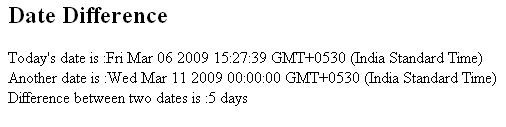
| <html> <h2>Date Difference</h2> <script type="text/javascript"> var today=new Date() var date=new Date(today.getFullYear(), 2, 11) var day=1000*60*60*24; document.write("Today's date is :"+today+"<br>"); document.write("Another date is :"+date+"<br>"); document.write("Difference between two dates is :"+ Math.ceil((date.getTime()-today.getTime())/(day))+" days") </script> </html> |
Output will be displayed as:


Tutorials
- Java 26 (JDK 26) Features with examples
- Top 10 Reasons to Learn Java in 2026
- JDK 26 Tutorial
- Java Certification Roadmap 2026: Which Oracle Certs Matter
- Install JDK 26: A Complete Beginner's Guide (2026)
- What Is Java? A Complete, Up-to-Date Guide for 2026
- Java 26 HTTP3 tutorial - HTTP 3 support in JDK 26 - How to use HTTP/3 in Java 26 application?
- JDK 28 Preview: Value Objects, Shenandoah GC & JSON API
- Java Tutorials