
JavaScript Email Validation
|
|
In this section we are going to check email Validation using JavaScript.
JavaScript allows to perform a client side validation of email Ids in several forms. For this purpose, we have created an example which shows how you can validate an email address for a form. The function checkEmail() checks if the entered email id has the general syntax of an email. When user submits the email address then it calls the ValidateEmail() function which validates the email entered by the user in the text box.
Here is the code:
| <html> <h2>Email Validation</h2> <script language = "Javascript"> function checkEmail() { if (/^\w+([\.-]?\w+)*@\w+([\.-]?\w+)*(\.\w{2,3})+$/.test(form.email.value)){ document.write("You have entered valid email."); return true; } return false; } function ValidateEmail(){ var emailID=document.form.email; if ((emailID.value==null)||(emailID.value=="")){ alert("Please Enter your Email ID") emailID.focus() return false } if (checkEmail(emailID.value)==false){ emailID.value="" alert("Invalid Email Adderess"); emailID.focus() return false } return true } </script> <form name="form" method="post" onSubmit="return ValidateEmail()"> Enter an Email Address : <input type="text" name="email" size="30"><br> <input type="submit" name="Submit" value="Submit"> </form> </html> |
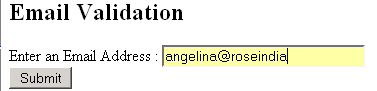
Output will be displayed as:

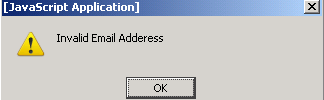
When user enters the invalid email, an alert box is displayed showing error message:


Tutorials
- Clear cookie example
- JavaScript getElementById innerHTML
- JavaScript getElementById Style
- Javascript Examples
- JavaScript add row dynamically to table
- New Page 1
- JavaScript Change link
- JavaScript Checkbox getElementById
- javascript clear textarea
- JavaScript Clock Timer
- JavaScript Cookies
- JavaScript Date Difference
- JavaScript duplicate string
- JavaScript Email Validation
- javascript focus input
- JavaScript get excel file data
- JavaScript getAttribute Href
- JavaScript getAttribute Style
- JavaScript getElementById div
- JavaScript getElementById Iframe
- JavaScript getElementById select
- JavaScript Hide Button
- JavaScript Hide Div
- JavaScript hide image
- JavaScript Hide Table Column
- JavaScript Hide Table Rows
- JavaScript Key Event
- JavaScript link
- JavaScript method location
- JavaScript move div
- JavaScript move file
- JavaScript move image
- JavaScript Navigate Back
- JavaScript navigate to page
- JavaScript Navigate to URL
- JavaScript indexOf substring
- JavaScript onkeypress event
- JavaScript Open file
- JavaScript Open link in new window
- JavaScript Open Modal Window