
JavaScript getAttribute Href
|
|
In JavaScript we can get the URL value of the linked resource by getting the HREF value of the link. We can achieve this in two ways :
- document.getElementById('myLink').href or
- document.getElementById('myLink').getAttribute('href')
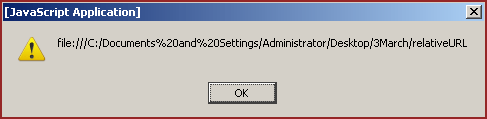
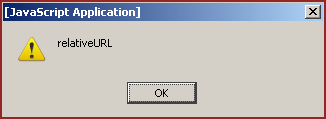
The first way returns the whole URL of the linked resource and another returns only the exact URL of the linked resource. To explain use of getAttribute("href") we have created a simple example here.
Explanation :
This HTML page contains one link and one button. On the click event of the button it calls a function getAttributeHREF() which is defined in the JavaScript in the <script></script> tag. In this function first line will get the whole URL path of the linked resource by the "document.getElementById('myLink').href" and another line will show exact path in the alert message by the document.getElementById('myLink').getAttribute("href").
Here is the full code :
<html>
 <head>
  <title>
    getAttribute HREF Example
  </title>
  <script language="javascript" >
    function getAttributeHREF() {
      alert(document.getElementById('myLink').href);
      alert(document.getElementById('myLink').getAttribute("href"));
    }
  </script>
 </head>
 <body>
<div style="background: #DFDFFF; width:'100%';" align="center">
 <font color="#000080" size="12pt">
  <b>getAttribute HREF</b>
 </font>
</div>
<center>
 <div style='float:inherit'>
	<a id="myLink" href="relativeURL" >
            This is the link with HREF="relativeURL"
        </a>
 </div>
</center>
<center>
<div>
 <input type="button" value="showHREF"
    onClick="getAttributeHREF();">
</div>
</center>
</body>
</html>
|
Output :
Output page will be as given below :
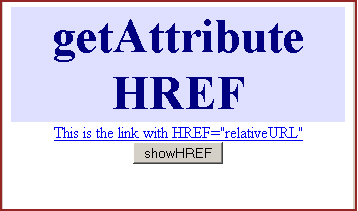
When you click on the button "showHREF" it calls the function "getAttributeHREF()" defined in the JavaScript. URL fetched with "href" property holds full address as shown below :
URL fetched with the getAttribute("href") method would be a relative URL as below :
You can also download full code from the following link:


Tutorials
- Clear cookie example
- JavaScript getElementById innerHTML
- JavaScript getElementById Style
- Javascript Examples
- JavaScript add row dynamically to table
- New Page 1
- JavaScript Change link
- JavaScript Checkbox getElementById
- javascript clear textarea
- JavaScript Clock Timer
- JavaScript Cookies
- JavaScript Date Difference
- JavaScript duplicate string
- JavaScript Email Validation
- javascript focus input
- JavaScript get excel file data
- JavaScript getAttribute Href
- JavaScript getAttribute Style
- JavaScript getElementById div
- JavaScript getElementById Iframe
- JavaScript getElementById select
- JavaScript Hide Button
- JavaScript Hide Div
- JavaScript hide image
- JavaScript Hide Table Column
- JavaScript Hide Table Rows
- JavaScript Key Event
- JavaScript link
- JavaScript method location
- JavaScript move div
- JavaScript move file
- JavaScript move image
- JavaScript Navigate Back
- JavaScript navigate to page
- JavaScript Navigate to URL
- JavaScript indexOf substring
- JavaScript onkeypress event
- JavaScript Open file
- JavaScript Open link in new window
- JavaScript Open Modal Window