
JavaScript Clock Timer
|
|
In this section, we are going to show you a clock timer using JavaScript.
In the given example, we have created the instance of Date to show the time. Here we have created a condition that if the number of minutes, seconds or hours is less than 9, then it will add 0 in front of min, sec or hour value like 09 in the timer and it will add AM or PM according to the hour value. By using the JavaScript method setTimeout("slideImages()",1000), the function displayTime() is called after every one second and performs the desired action when the target time is completed.
Here is the code
| <html> <h2>Clock Timer</h2> <script language="JavaScript" type="text/javascript"> function displayTime() { var date=new Date(); hour=date.getHours(); min=date.getMinutes(); sec=date.getSeconds(); if (min<=9) { min="0"+min; } if (sec<=9) { sec="0"+sec; } if (hour>12) { hour=hour-12; add="pm"; } else { hour=hour; add="am"; } if (hour==12){ add="pm"; } time = ((hour<=9) ? "0"+hour : hour) + ":" + min + ":" + sec + " " + add; if (document.getElementById){ document.getElementById('timer').innerHTML = time; } else if (document.layers) { document.layers.timer.document.write(time); document.layers.timer.document.close(); } setTimeout("displayTime()", 1000); } window.onload = displayTime; </script> <body> <span id="timer" style="position:absolute; left:10; font-family: ariel roman; font-size: 18pt; color:white; background:black"></span> </body> </html> |
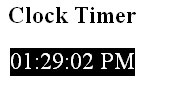
Output will be displayed as:


Tutorials
- Clear cookie example
- JavaScript getElementById innerHTML
- JavaScript getElementById Style
- Javascript Examples
- JavaScript add row dynamically to table
- New Page 1
- JavaScript Change link
- JavaScript Checkbox getElementById
- javascript clear textarea
- JavaScript Clock Timer
- JavaScript Cookies
- JavaScript Date Difference
- JavaScript duplicate string
- JavaScript Email Validation
- javascript focus input
- JavaScript get excel file data
- JavaScript getAttribute Href
- JavaScript getAttribute Style
- JavaScript getElementById div
- JavaScript getElementById Iframe
- JavaScript getElementById select
- JavaScript Hide Button
- JavaScript Hide Div
- JavaScript hide image
- JavaScript Hide Table Column
- JavaScript Hide Table Rows
- JavaScript Key Event
- JavaScript link
- JavaScript method location
- JavaScript move div
- JavaScript move file
- JavaScript move image
- JavaScript Navigate Back
- JavaScript navigate to page
- JavaScript Navigate to URL
- JavaScript indexOf substring
- JavaScript onkeypress event
- JavaScript Open file
- JavaScript Open link in new window
- JavaScript Open Modal Window